It is Wednesday afternoon. A client’s contract is open on the same laptop your teenager used last night for homework. The router is the one your internet provider handed over four years ago, and the password is still the one on the sticker. IT support for home based businesses is about taking that kitchen-table setup seriously without making it feel like an office.
You do not need a server room. You need three or four habits, set up once.
Is the kitchen-table setup really a risk?
Nobody is targeting your house. The risk is quieter, and it comes in three forms.
Shared devices
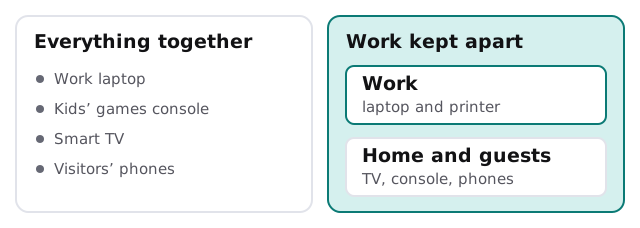
When the family computer doubles as the work computer, every app anyone installs sits beside your client data. Every password saved in the browser is available to whoever sits down next.
One flat network
On most home routers, everything is connected together: the work laptop, the games console, the smart speaker and the neighbour’s phone when they visit. If one of them is compromised, the others sit in plain sight.
Sign-ins with no second step
A business email account with only a password is the weakest door in the house. CISA’s Cyber Essentials, which is written for small organisations, frames access as making sure only the people who should have it do. A second step is the cheapest way to do that. Our page on business Wi-Fi security has the network side in more detail.
A Saturday morning, six jobs
- Give work its own account. If you must share a computer, create a separate sign-in with a strong password only you know.
- Turn on a second step for email, banking, accounting and your file storage.
- Change the router’s admin password and its Wi-Fi name and password, then split work from home if the router offers it.
- Turn on updates for the computer, the phone and the router, set to install automatically.
- Set up backups in three places, as below.
- Write down the five things you would need if the laptop died today: where files are, how to sign in, who to call.
Backups that survive a spilled coffee
Cyber Essentials lists data among its six areas, and the aim is straightforward: make backups, so that information critical to operations is not lost. The mistake is thinking a cloud folder counts.
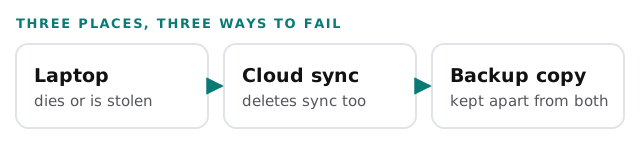
Test it once. Pick a file, delete it, and get it back from the backup copy. A backup you have never restored is a hope, not a plan.
When to bring in help
- A client asks for proof that you protect their documents.
- You want an insurance quote and the form asks about your security. See IT requirements for cyber insurance.
- You have started hiring and need accounts for people who are not in your house.
- Something broke, and nobody remembers how it was set up.
A real person replies within 1 business hour, Monday to Friday, 9am to 5pm Pacific. For a one-person business that is often the whole difference between a slow afternoon and a lost day. If your team is spread across several homes, our notes on IT support for remote teams cover the next stage.
Rather set the basics up yourself? Start with endpoint protection for small business for what to install on the laptop.
Your home is not an office, and it should not have to become one. It needs a locked front door and a spare key somewhere safe.
What we need from you
- A list of the devices used for work, including phones.
- Which accounts hold client information.
- The router model, if you can find it on the label.