The fourth location opens in six weeks. Somebody has to choose a router, find out why the second branch’s printer only works from one desk, and remember that the first office has an old server that holds something important. IT support for multi location businesses exists so that opening location four feels like using a recipe, not inventing one.
The trouble with growth is that each new site copies the last site’s problems, plus a few of its own.
Why the third site is where it breaks
With one office, the setup lives in one head. With two, the person who knows it can still drive between them. By the third, three setups were built in three different years by three different people. Nobody can say which is the odd one out, and nobody wants to touch the one that works.
You can spot it from a handful of symptoms.
- A fix that works at one site does not work at another, for reasons no one can explain.
- Staff at one branch have different access from staff doing the same job at another.
- A leaver is switched off at head office, but still has a login at the branch.
- Each site has its own internet provider, and nobody holds all the account numbers.
- You cannot say how many computers the business owns.
One view across all sites
The core idea is a single place where every site’s users, devices and settings are visible and managed.
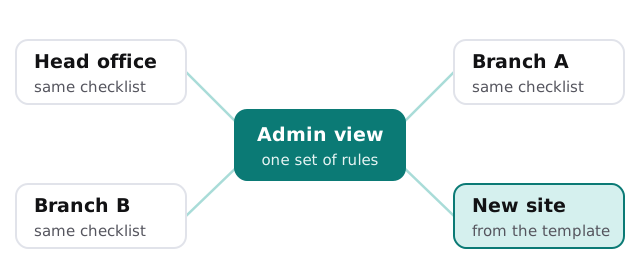
It does not mean everything routes through head office. Each site still has its own internet line and its own local equipment. What is shared is the rulebook and the record.
What is the same, and what is local
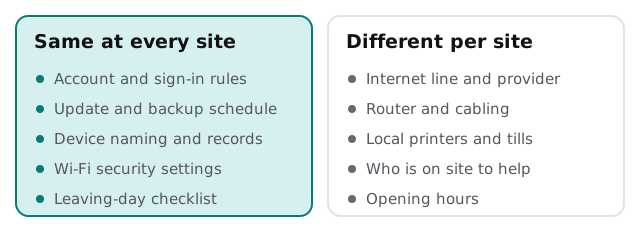
The right-hand column is reality and no one should fight it. A branch in an old building will have a different router from one in a new unit, and that is fine, provided it follows the same rules and is written down.
Building a site template
- List what every site needs. Internet, a router, Wi-Fi for staff, Wi-Fi for visitors, a way to print, a way to take payment if that applies.
- Pick the standard choices. The same type of router, the same settings, the same naming of devices.
- Write the first-day steps. What gets ordered, when, by whom, and what a person on site has to do.
- Write the leaving-day steps. Who switches off access, collects devices and updates the records.
- Test the template on the next site and fix the page afterwards, while it is fresh.
When a site is bought or merged rather than built, the same list becomes an assessment: which parts match the template, and which need to be brought in line.
Questions to ask any provider
- Do you keep one record for every site, or one per site?
- When a branch calls, does the person answering already know their setup?
- How do you treat a site that cannot be brought in line right away?
- Who decides when a local choice should become a standard?
- What do I get on paper at the end of each month?
Where this connects
Keeping a register of every device across every site is the starting point, and IT asset tracking for small business shows what that record looks like. The sequence for each new starter and leaver is covered in employee onboarding and offboarding IT. The branch Wi-Fi advice lives in business Wi-Fi security, and the office-by-office view of what monthly care includes is on managed IT services for small business.
A second location should multiply your revenue, not your IT. If it multiplies your passwords, something is off.
What we need from you
- A list of sites with addresses and the main contact at each.
- The internet provider and account for each location, if you have them.
- A sense of which site you worry about most, and why.