Someone leaves on a Friday. On Monday the question is where their laptop is, whether it was ever returned, and whether anyone has wiped it. If the answer is “I think it’s in a drawer”, you have an asset-tracking gap.
IT asset tracking for small business is a plain list with a few good habits. It does not need expensive software. It needs a record for every device and somebody whose job it is to keep it true.
One device, six stops
A laptop’s life has the same stages every time. The register records each one, so a device is never in an unknown state.
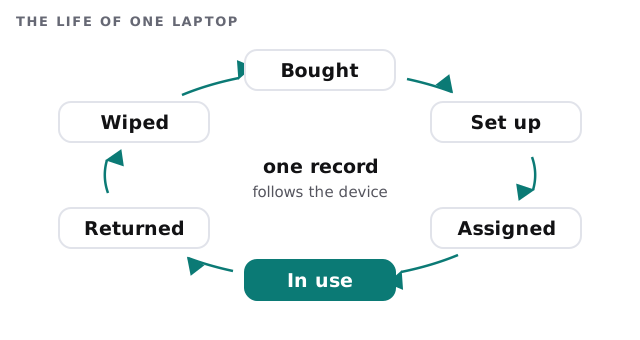
When a wiped laptop is reassigned, the cycle simply starts at “Assigned” again.
The fields that earn their place
Fewer fields get filled in. These are the ones worth the effort:
| Field | What it answers |
|---|---|
| Serial number | Which physical machine is this? |
| Assigned to | Who has it right now? |
| Purchase date | How old is it? |
| Warranty end | Is a repair ours to pay for? |
| Operating system and version | Does it still get updates? |
| Planned replacement year | When do we budget for it? |
| Status | In use, spare, in repair or retired |
The operating-system field pays off at the end of a product’s support window. Our page on the Windows 10 end-of-support upgrade is a good example of a deadline you can only meet if you know which machines are affected.
Why a list is a security control
CIS Control 1 asks you to actively manage, which it defines as inventory, track and correct, all enterprise assets connected to your infrastructure. That includes end-user devices, network devices, non-computing and Internet-of-Things devices and servers. The stated goal is to know the full set of assets that need monitoring and protection, so that unauthorised and unmanaged ones can be found and removed or fixed.
In an office of fifteen that means two things. A device nobody knows about cannot be patched or protected. And a device that is still active after its owner has left is an open door. Tracking comes first; our notes on endpoint protection for small business cover what happens to the devices once they are listed.
Replace on a schedule, not in a panic
When five laptops were bought in the same month, they all reach the end of their useful life together. That is a single large invoice and a bad week.
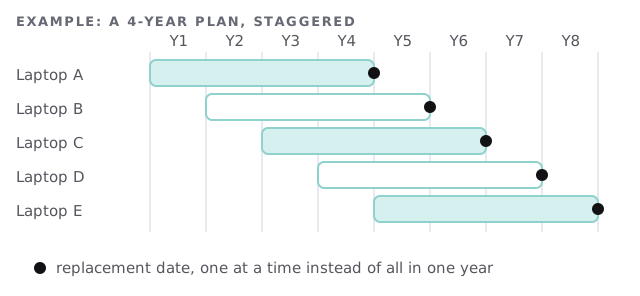
With a purchase date for every device, you can move one or two machines forward and smooth the spend. The same list tells you when a new hire’s laptop already exists in a cupboard.
Who keeps it true
A register decays the day nobody owns it. Pick one person, usually whoever receives the deliveries, and give them three habits: log a device when it arrives, change the name when it moves, and mark it retired when it goes. Ten minutes a month beats an annual clean-up that takes a weekend and still misses the spare phone in the drawer.
What happens when someone leaves
- The device is collected and its status changes to returned.
- Access is removed from the accounts that device could reach.
- The disk is wiped, and the date is written next to the record.
- It either becomes a spare or is retired.
That fits into the broader checklist in employee onboarding and offboarding IT. If you are moving people to new machines at the same time, see computer migration to new laptops.
If you cannot say where a device is, you cannot say what is on it. Start with the list, and keep it boring.
What we need from you
- A walk through the office, or a list of what you think you own.
- Invoices or order emails for anything you can’t identify.
- A name for who gets told when a device moves.