Endpoint protection for small business used to mean installing antivirus and forgetting about it. Today it means deciding which devices need an agent, who sees the alerts, and what happens when one fires. The “endpoint” is any device your people use to reach company data: laptops, desktops, phones, sometimes a server in a cupboard.
Antivirus and detection are different questions
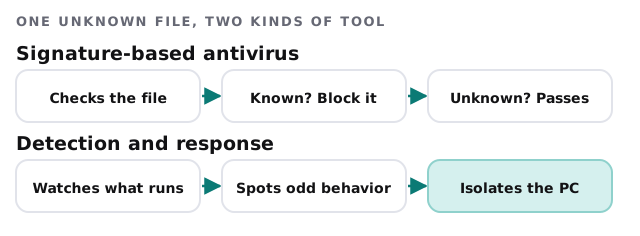
Traditional antivirus asks whether a file is known to be bad. Endpoint detection and response, usually shortened to EDR, asks what a program is doing and whether that looks like an attack. Microsoft’s Defender for Business includes both next-generation protection and an optimized EDR, plus attack surface reduction, automated investigation and remediation, and automatic attack disruption.
Which devices to cover
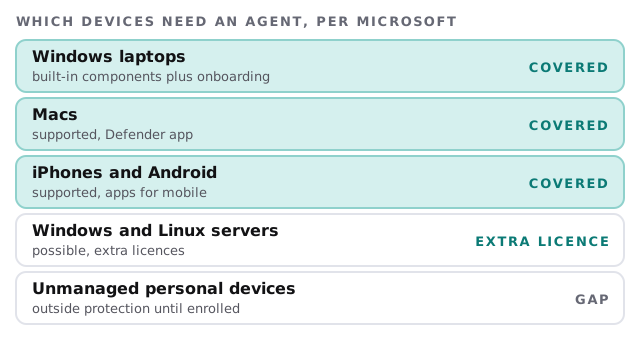
Microsoft says Defender for Business supports Mac, iOS and Android as well as Windows, and that servers need extra licences. That matches how offices really work, which is a mix of machines.
A buying guide, in four questions
| Question | Why it matters |
|---|---|
| How many devices, and which kinds? | Decides whether one product covers everything |
| Who watches the alerts? | A tool nobody looks at is only a log |
| Can it run alongside what you already pay for? | Business Premium includes Defender for Business |
| What happens when it flags a device? | Isolation and cleanup should be a procedure, not a panic |
If you already have Microsoft 365
Microsoft says Defender for Business is included in Microsoft 365 Business Premium. It’s also available standalone for eligible organizations with up to 300 users, including those on Business Basic or Standard. Before buying anything else, we check what you’ve already got and whether it’s switched on.
If you don’t
Then it’s a choice between a few well-known products. The decision factors don’t change: coverage across your device mix, central management, and someone who reads the output.
Rolling it out
- Inventory every device that touches company data, including the personal phones.
- Remove what’s there. Old or competing antivirus tools can clash, so they’re uninstalled cleanly.
- Pilot on a handful of machines for a few days and note anything that breaks.
- Roll out in waves, with policies set centrally and one default for all.
- Test the response by running a harmless test file and seeing who gets the alert.
- Review monthly. Which devices have fallen out of management, and which alerts were real?
Signs your current protection isn’t doing the job
- Nobody can say how many devices have it installed.
- Each laptop runs a different product, bought at a different time.
- The only alert anyone has seen was a pop-up on a staff member’s screen.
- Phones that read company email have no protection or management at all.
- A machine was cleaned up after an incident, and nobody wrote down what happened.
An alert, on an ordinary Wednesday
A bookkeeper opens an invoice attachment that looks routine. The program it starts behaves oddly: it tries to touch many files in a short time. The detection tool notices the behavior, isolates the laptop from the network and raises an alert. The person who owns alerts sees it within the working day, checks what the tool found, confirms the machine is clean, and releases it. The bookkeeper loses an hour. Without the tool, the same file could have spread to a shared drive before anyone knew.
What it won’t do
- Replace patching. An unpatched machine is easier to attack, whatever’s installed. Updates are the other half of the job.
- Stop a phished password. That’s the job of multi-factor sign-in.
- Protect devices you don’t know about.
What we need from you
- A list of the devices in use, or access to your Microsoft 365 admin center so we can build one.
- Whether you have any servers.
- A decision on who receives alerts at your end.
- A time for a short pilot that won’t disrupt a busy day.
Endpoint protection is only as good as the list of devices it’s watching.