Nobody shops for a small business backup and recovery service because they love backups. They shop after a laptop dies, a folder gets deleted, or a story about ransomware gets a bit too close to home. So judge the service the way you’ll use it: by how quickly and completely it gets your work back.
Start with three questions about the restore
Before you compare features, answer these for your own business:
- What do we need back first? Accounting data and client files usually outrank everything else.
- How much recent work can we afford to lose? An hour? A day? That decides how often copies are taken.
- How long can we wait? A missing folder is an annoyance. A dead server is a standstill.
Providers use jargon for the last two (recovery point and recovery time). The questions above are the same thing in plain words, and any decent provider should be able to answer them for each system you run.
What CISA asks of your data
CISA’s Cyber Essentials treats data as one of six areas and asks leaders to make sure backups protect information critical to operations. Its guidance is specific on three points:
- Automate. Set up regular automated backups and redundancies for key systems.
- Protect the backups themselves. Physical security, encryption and offline copies keep one bad day from taking the originals and the copies together.
- Plan to restore. Have plans to recover systems, networks and data from known good backups, with roles and responsibilities written down.
Where your cloud’s own recovery stops
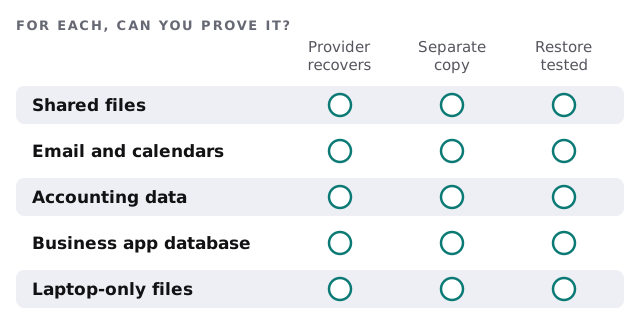
Moving files to the cloud doesn’t end the backup question. Microsoft’s documentation for SharePoint and OneDrive points to several recovery tools: version history, the recycle bin, and a feature that lets users restore an entire OneDrive to any point within the past 30 days. After an item leaves the site collection recycle bin, Microsoft says you can call support within 14 days to ask for a backup.
Those are useful, and they are windows with edges. A file deleted last month, quietly, by an unhappy employee may fall outside them. Whether that’s an acceptable risk is your call, and it’s the reason to ask what a separate copy would add.
What breaks, and what brings it back
| What goes wrong | What restores it |
|---|---|
| A file is overwritten or deleted | Version history, or an earlier copy of the file |
| A laptop is lost or dies | Cloud-stored files, plus a way to rebuild the machine |
| Ransomware encrypts a shared drive | A clean copy the attacker couldn’t reach |
| A server fails | A tested image or rebuild plan |
| An employee leaves and clears their account | A separate copy, held by the business |
The restore drill
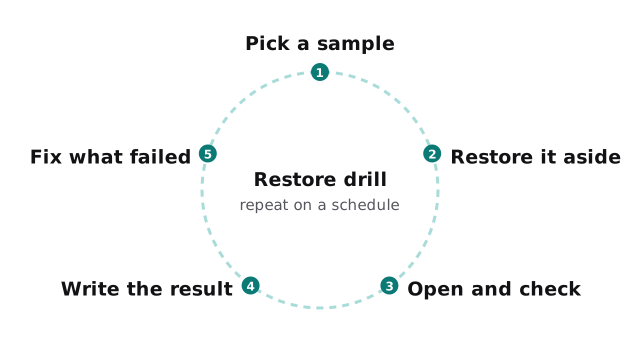
A backup that has never been restored is a hope. A drill proves it works, and it’s the single most useful habit in this whole page.
Questions to ask any provider
- Can you restore one file, one mailbox and one whole machine, and show me each?
- Where does the second copy live, and could someone with my admin login delete it?
- Who gets alerted when a backup fails, and what do they do?
- When was your last real restore for a customer like me?
- What happens to my copies if I leave?
What we do
Monthly care covers access controls, backups and updates, so the routine work of making copies and keeping systems patched is handled as a habit, not a project. We start with the free IT check, list your systems, work out with you what needs a separate copy, and send a plan and a fixed quote. A real person replies within one business hour, Monday to Friday, 9am to 5pm Pacific.
A backup is a promise about the future. A restore test is how you find out whether it’s true.