Most people who go looking at the options for switching IT providers have already decided. What they haven’t decided is how to do it without a week where nobody can reach the firewall, the domain, or the person who knows where the backups live.
Start by finding out what you hold
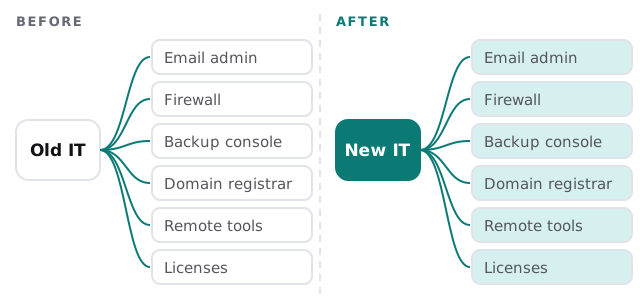
Before anyone gives notice, find out which keys you actually have. In many small offices, a provider set things up years ago under its own accounts, and the owner has never logged in to some of them.
- Domain registrar. Can you log in to the account that controls your domain name? If the domain lapses or points elsewhere, email and your website go with it.
- Email and file admin. Is there an admin login in your name for Microsoft 365 or Google Workspace, with a second sign-in step you control?
- Network equipment. Do you know the admin details for the firewall, router and Wi-Fi?
- Backups. Who has the console, where do the copies live, and could you open them yourself?
- Subscriptions and licenses. Which are in your company’s name, and which are billed through the provider?
- Documentation. Is there a network map, a list of devices and a password vault, or does it live in one technician’s head?
Overlap, don’t hand over cold
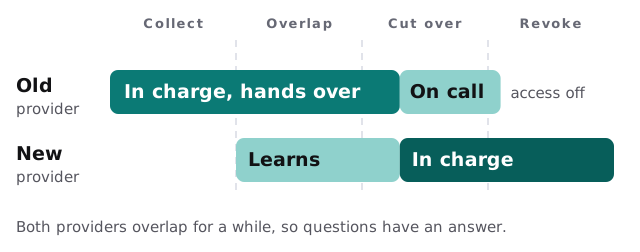
A clean break looks tidy and tends to go wrong. A short overlap, where both providers are available, means the new team can ask the old one how things really work, and you’re not left with a gap if something breaks on day one.
What the new provider should ask for
- A written list of systems, accounts and vendors in scope
- Any open tickets or half-finished projects
- Documentation, even if it’s rough
- A walk-through of the three most fragile things in the setup
Closing the old provider’s access
This is the step most often forgotten. The old provider will usually have standing access to many of your systems, and that access doesn’t end because the invoice does. CISA’s Cyber Essentials asks organizations to make sure only the people who belong on the digital workplace have access to it. After a handover, that includes removing the people who no longer should.
Microsoft’s partner model shows the principle clearly. Its granular delegated admin privileges for partners are least-privileged and time-bound, and customers must explicitly grant them. So in a Microsoft 365 setup, part of your checklist is looking at which partner relationships your account has granted, and removing the ones that no longer apply. Other tools will have their own equivalents: remote-support agents, vendor portals, shared passwords and VPN accounts.
Change shared passwords at the end, not the start. Change them too early and you break your own systems; too late and the old provider still holds a working key.
Questions to put to the new provider
| Ask | A good answer sounds like |
|---|---|
| How will you take over without a gap? | A plan with an overlap, not “we’ll switch on Monday” |
| Whose name are accounts created in? | A clear answer, in writing, with the reason |
| What do I get in writing? | A list of systems, access and who holds each |
| How do you handle our passwords? | A vault you can see into, with access you control |
| What happens if we leave you? | A straight answer, not a pause |
How we handle a handover
We start with the free IT check: we list your systems, find what’s in whose name, and send a plan and a fixed quote. Monthly care then covers access controls, backups and updates, so the first jobs after a switch are the ones above: confirm who can get in, confirm the backups, and bring the updates up to date. A real person replies within one business hour, Monday to Friday, 9am to 5pm Pacific.
If you’re also thinking about whether to hire someone instead, hiring an IT person vs outsourcing lays out that choice, and if your IT person has just left, see our IT person quit.
The move isn’t finished when the new provider is in. It’s finished when the old one can’t get in.