A few years ago, a cyber insurance application was a page of easy questions. Now it reads like a security audit, and the answers matter: the policy is priced on them, and they’re checked again if you ever make a claim. Knowing the IT requirements for cyber insurance before you fill in the form is the difference between a smooth renewal and a scramble.
Questions you’re likely to see
Wording varies by insurer, but the same controls come up again and again:
| Control | What the application usually wants to know |
|---|---|
| Multi-factor sign-in | Is it on email, remote access and every admin account? |
| Endpoint protection | Is detection and response software on every computer and server? |
| Backups | Are they kept separate from the network, offline or locked, and tested? |
| Security updates | Are critical updates applied within a set number of days? |
| Email security | Is incoming mail filtered for phishing and malicious attachments? |
| Training | Do staff get regular phishing training? |
| Admin accounts | Are admin rights limited and kept apart from everyday accounts? |
| Incident plan | Is there a written plan for what to do after an attack? |
Answer honestly, then prove it
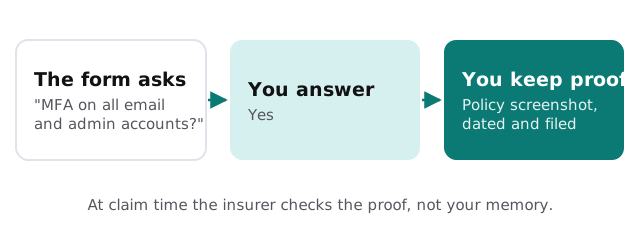
- Fix gaps before you sign. If the honest answer is “partly”, close the gap first rather than ticking yes.
- Collect evidence. Screenshots of sign-in policies, backup reports, a list of protected devices, training records.
- Date it and keep it. Store the evidence somewhere the business owns, ready for renewal or a claim.
- Re-check each year. Controls drift. A new hire without multi-factor sign-in turns a true answer false.
Backups that survive ransomware
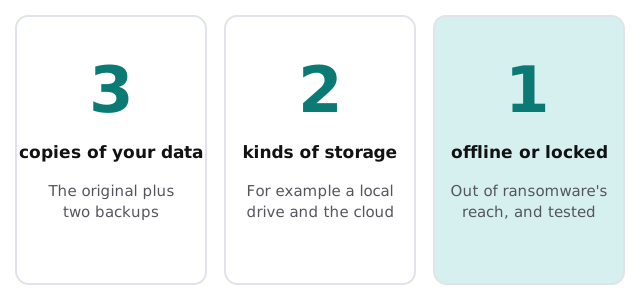
Insurers ask about backups because ransomware goes after them first. A backup drive that’s always plugged in gets encrypted along with everything else. The long-standing 3-2-1 rule is the simplest way to think about it:
Common gaps
- Multi-factor sign-in on everyone’s email, but not on the main admin account.
- A backup drive that never gets disconnected.
- Everyone in the office has admin rights “to make installs easier”.
- An old remote access setup that still accepts just a password.
- No up-to-date list of which devices exist, so nobody can say all of them are protected.
Endpoint protection, in plain words
Older antivirus looks for known bad files. Endpoint detection and response watches what programs actually do, flags behavior that looks like an attack, and can isolate a computer from the network while someone investigates. Insurers ask about it because ransomware often uses tools that look harmless until they start encrypting files.
When the insurer runs its own scan
Some insurers scan your internet-facing systems from the outside before quoting. They look for things like remote desktop open to the internet, old remote access gear with known flaws, and expired certificates. If a scan flags something, fix it and keep a note of when, because the same finding can come up again at renewal.
Admin accounts, kept apart
Applications increasingly ask whether people with admin rights use a separate account for admin work. The reason is simple: the account that reads email and browses the web is the one most likely to be tricked. If that same account can change every setting in the business, one bad click becomes everyone’s problem. A separate admin account, used only when needed and protected with its own multi-factor sign-in, closes that gap for very little effort.
Every yes on the application is a promise. Make sure each one is true on the day you sign, and stays true all year.