Most accounting firms do not need a permanent IT department. They need a few well-planned projects each year, none of them in the weeks when every partner and seasonal hire is racing a deadline. That is what IT consulting for accounting firms should look like: a short list of decisions, scheduled around your calendar.
Pick the months first
The filing year decides what is safe. The IRS says an individual extension gives you until October 15 to file, while tax owed is still due at the April date. That produces two crunches and two quieter windows.
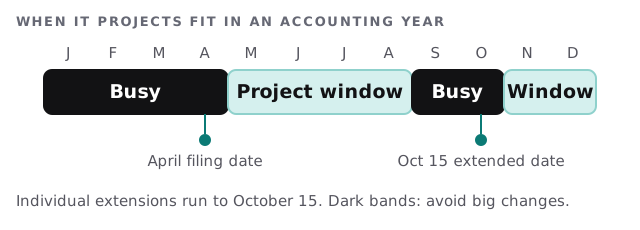
Moving the file server in March is the classic mistake. Moving it in June is just a project.
What an engagement delivers
| Engagement | What you hold at the end | A good time for it |
|---|---|---|
| IT assessment | A ranked list of what to fix and why | Any time, since it changes nothing |
| Security plan | A written plan scaled to your firm | Before the next busy season |
| Software review | A recommendation among tax, workflow, portal and accounting tools | After the filing date |
| Migration | Files, email or software moved with a rollback plan | Summer or winter windows |
| Seasonal-staff setup | Accounts, devices and access ready in advance | Weeks before they arrive |
The security plan, in plain words
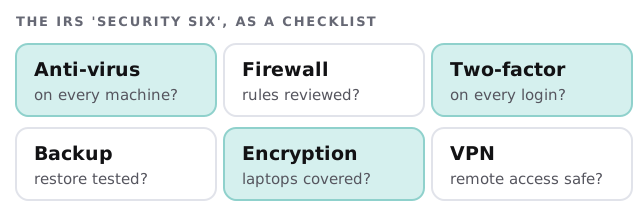
The IRS says federal law requires professional tax preparers to create and maintain an information security plan for client data. It asks preparers to focus on employee management and training, information systems, and detecting and managing system failures. Our page on managed IT for accounting firms goes into the FTC rule behind that plan.
The IRS also lists six basic protections to deploy. A consultant turns that list into questions about your actual machines.
A June morning
Here is what the same consultant looks like in June. The returns are filed, the partners have time, and a migration that would be reckless in March is routine. Across a handful of sessions the firm reviews its accounts, retires logins for the seasonal staff who have left, and writes down how a new hire gets set up next January. The work is dull, which is exactly what you want from it.
The software question
Accounting firms run four or five categories of tool at once: tax preparation, practice or workflow management, a client portal for documents, e-signature and a general ledger platform. They rarely fit together neatly. A consultant’s job is not to pick a favourite. It is to ask four questions of each choice:
- Who in the firm enters the same data twice today?
- What breaks if this vendor changes its price or its product?
- Can a seasonal hire get started in a morning?
- Can we leave, and take our data, in a usable form?
If chasing clients for documents is the loudest problem, client document collection for accounting firms is a smaller, faster project.
Where firms get stuck
- Shared logins. One account for the tax software, used by six people, so nobody can say who did what.
- Seasonal staff. New people on borrowed laptops with full access to every client.
- The partner’s exception. The one machine that skips every control.
- Nobody owns it. The office manager is the IT department in a spare hour.
A sensible first quarter
The plan we usually suggest is short: an assessment, then the security plan, then a ranked list of three projects slotted into your quiet windows. The first step is the free IT check, and you get a plan and a fixed quote before any project begins.
The best IT project at an accounting firm is the one nobody noticed happening, because it finished in June.
What we need from you
- Your busy and quiet months, in your own words.
- A list of the tools the firm uses, including the ones one person pays for personally.
- Whoever signs off on spend, in the room for the first conversation.