It is Friday, ten to four. A client has emailed to ask whether the deposit went through and when the crew arrives. Someone on your side opens the invoice system, then the calendar, then last week’s email thread, and writes a polite paragraph that took twelve minutes. Multiply by every client you have, every week. Client portal development for small business is the fix for that pattern: a private page where each client can see the answer without asking. If you have searched for a custom client portal, this is what it usually means.
One screen, three questions
Most clients ask the same three things. What is happening, what do you need from me, and what do I owe? A good portal answers all three before they type.
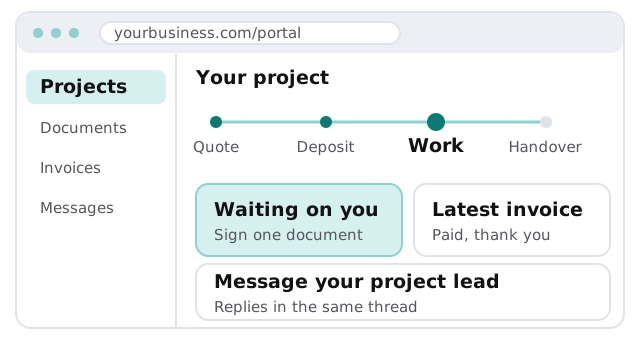
Email today, portal tomorrow
| Moment | By email | In a portal |
|---|---|---|
| Client asks for progress | Someone checks three systems | The tracker already shows it |
| A document needs signing | Attached, lost, re-sent | Sits on the screen until done |
| Invoice question | “Can you resend it?” | Always listed, with its status |
| Staff member is away | Client waits for their return | Any colleague sees the same page |
| End of the job | Files scattered across inboxes | One folder, nothing missing |
The pattern in that table is the point. Each row is a small interruption that disappears once the answer is on a page the client can open themselves, and your staff get their afternoons back for the actual work.
Who sees what
The hard part of a portal is not the screen. It is making sure one client can never see another’s files. That is decided by roles, written down before anything is built.
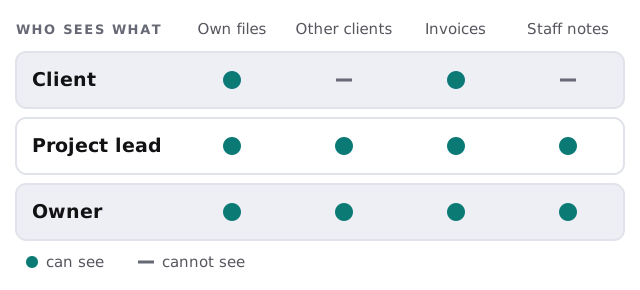
Ask any developer how this is enforced. “We hide the other clients’ links” is not an answer. The data itself should be filtered by who is signed in, so that guessing a web address shows nothing.
What we typically build
- Sign-in. A simple route in, with a link by email or a password, and a way for you to switch someone off.
- The job record. Stages that match how you actually work, each with a plain-language label.
- Documents. Upload and download, with a “needs signature” flag.
- Invoices. Pulled from your accounting tool so there is one source of truth.
- Messages. A thread on each job, copied to your team’s inbox so nothing is missed.
- An admin view. For your staff, to update a stage in one click.
Build or buy?
Buy when
- Your needs are files and a status email.
- Clients are happy with a shared folder.
- You have one service and one workflow.
Build when
- Your job stages are particular to your trade.
- Different staff need different views of the same job.
- You want invoices, calendar and files to feed one page.
- Branding and a smooth first login matter to your clients.
If you already track work in a tool like Airtable, a portal can sit in front of it. Our page on an Airtable developer for small business explains that side.
Signs you are ready
- Client status emails take up part of every week.
- Documents get sent twice because nobody can find the first one.
- You have had a near miss where the wrong file went to the wrong person.
- Clients ask for “a login” before you offer one.
What we need from you
- A rough list of the stages a typical job goes through.
- The documents clients send and receive.
- Who on your team should update what.
We start with a plan and a fixed quote. A person on our side approves the access rules with you before any real client logs in.
A portal is a promise that the client never has to ask. Build the answer to their first question first.