Most small businesses should buy a CRM, not build one. That is the honest start, and a custom CRM for small business only makes sense after a ready-made one has stopped fitting. Custom CRM development is for the team that has tried the standard tools and keeps working around them: the extra spreadsheet, the notes field stuffed with codes, the second system for jobs. If that sounds familiar, the sections below show what a build looks like and what it should cost you in effort, not just money.
Buy or build, side by side
| Question | A ready-made CRM | A custom CRM |
|---|---|---|
| Time to first use | Days | Longer, and it needs a plan first |
| Your own stages and fields | Within the tool’s limits | Exactly yours |
| Screens per role | A few preset views | Built for each role |
| Upkeep | The vendor handles it | You and your builder share it |
| Leaving later | Export what the tool allows | Your database, in a standard form |
If most rows favour the left column, buy. Ready-made wins on speed and upkeep every time.
Draw the pipeline first
Before any software, sketch the board your team already works from, even if it lives on a whiteboard. Each column is a stage. The useful part is the line under it: what must be known before a lead may move on.
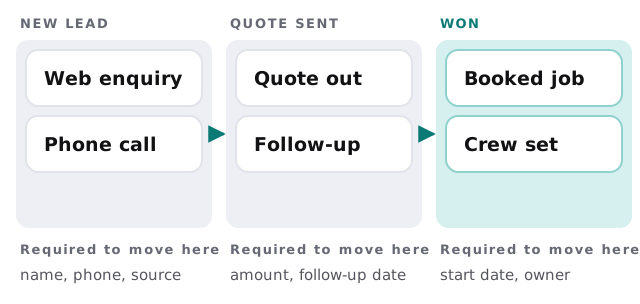
Rules that make it custom
- Conditional fields. A roofing enquiry asks for a pitch and access, a bookkeeping one asks for a year-end. Standard tools show everyone the same form.
- Role screens. The estimator sees measurements, the owner sees margin, the office sees dates.
- One record for the whole story. The lead, the quote, the job and the invoice sit together instead of in three tools.
- Your wording. Stages named the way people talk, not the vendor’s labels.
- Hand-offs. A won deal creates the job and tells the crew without a copy and paste.
None of these is exotic. They are small decisions that a standard tool makes for you, and a custom build lets you make again. The cost is that you now own those decisions, so we write each one down in plain words before building it.
What a CRM should hear about
A CRM is only as good as what reaches it. Leads, emails, meetings and payments each come from somewhere else, and a build spends as much time on the arrows as on the screens.
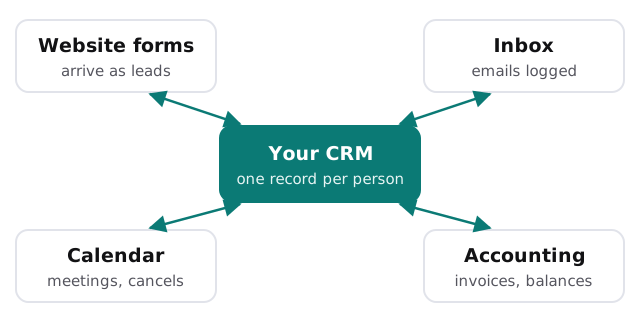
We have separate pages on two of those links: website form to CRM automation and calendar booking to CRM automation. Build those first even in a ready-made CRM, because they pay off whichever route you take.
Questions to ask any builder
- Can I export everything? Ask to see it done on a test record.
- Who can see which records? Roles should be set in the data, not just hidden in menus.
- What happens when a connection fails? You want an alert to a named person, not silence.
- Who maintains it? Ask what happens when your process changes next year.
- What did you leave out? A good plan lists features you decided against.
Rather build it yourself?
Try a ready-made tool properly before committing. Our guides cover HubSpot, Pipedrive and Zoho CRM, and a month of honest use will tell you exactly which gaps are real. Come to us with that list.
What we need from you
- The pipeline as it runs today, with real examples of won and lost deals.
- The side spreadsheets your team keeps.
- A decision on who owns the CRM day to day.
We begin with a plan and a fixed quote, and a person approves how records are matched and moved before the first real lead goes through.
A CRM that fits badly gets abandoned. One that fits too exactly needs a plan for change.