It’s Friday afternoon, and the spreadsheet that runs the business has been open on Dana’s computer since Monday. Nobody else can edit it, because the last time two people did, a week of entries vanished. Dana is on holiday next week. This is the moment when most owners start wondering whether to replace spreadsheets with a custom app.
Read the sheet like a blueprint
A heavily used spreadsheet is a design document nobody meant to write. Each feature of the sheet is a decision about how the business works, and each has a more reliable counterpart in an app.
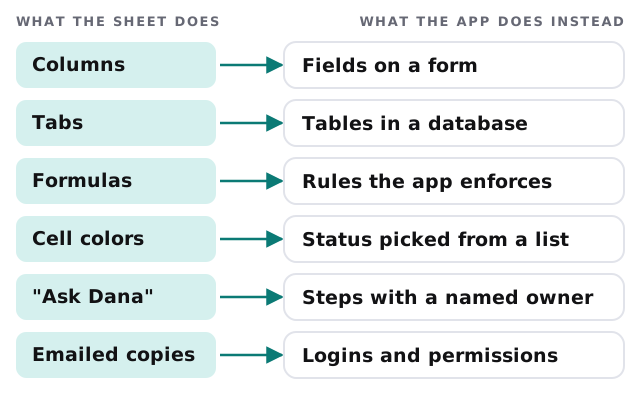
The most valuable part of any build is usually the “Ask Dana” row. Rules that live in someone’s head become steps with a named owner, and that’s what lets the business keep running when she’s away.
Three checks before you commit
- Count the editors. If more than one person needs to change the sheet on the same day, you’re relying on luck. An app handles simultaneous users by design.
- List the rules. Write down every “if this, then that” the sheet enforces, including the ones expressed as cell colors. If you can’t list them in an hour, the sheet knows something you don’t.
- Ask who should see what. A sheet shows everything to everyone with access. An app can show a technician their jobs and a manager the whole board.
Size limits are the check people expect, but they rarely decide it. Excel allows 1,048,576 rows by 16,384 columns on a worksheet, and Google Sheets allows up to 20 million cells or 100 MB. A business with a few thousand rows has plenty of room. It’s still in trouble if the process around those rows is fragile.
What should stay a spreadsheet
Not everything belongs in an app. A good build leaves some work where it is.
| Keep it in a sheet | Move it to an app |
|---|---|
| One-off analysis and what-if numbers | Records that many people create and update |
| Reports you export for a meeting | Anything with approvals, statuses or deadlines |
| A list only you ever touch | Data that other tools or customers need to see |
| A quick prototype of an idea | The thing your business can’t run without |
Moving without a big bang
Switching on a Monday and hoping is how sheets come back. A safer path changes the source of truth once, on purpose.
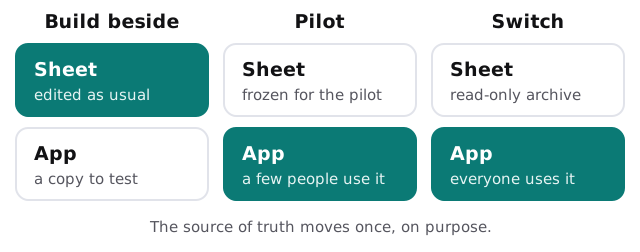
During the pilot, the people using the app stop editing the sheet. If they need the old figures, they look. When the pilot group is happy, everyone moves, and the sheet stays as a read-only archive that you can always open.
What we’ll ask you for
- The spreadsheet itself, with real data, and a note of anything you know is wrong in it
- A walk-through from the person who knows it best, recorded if possible
- A list of who uses it and what each person needs to see or change
- The reports that other people expect, so they keep arriving
We use these to draft a plan and a fixed quote after the free IT check. A real person replies within one business hour, Monday to Friday, 9am to 5pm Pacific.
Related reading
If your data lives in Google Sheets and has outgrown it, Google Sheets to database migration goes deeper on that move. For the general case of tools built for one business, see custom internal tool development for small business, and for a decision between building and buying, custom software vs off-the-shelf for small business. If what you really need is a better spreadsheet, an Excel automation expert may be the right first step.
A spreadsheet is a fine place to think and a poor place to run a business. Move the running, and keep the thinking.