At seven in the morning a dispatcher writes the day’s jobs on a whiteboard, texts the addresses to four people and hopes they remember. At five a technician photographs a handwritten sheet and sends it to the office. Somewhere between, a customer calls to ask whether anyone is coming. A custom field service app replaces that chain with a single phone screen per technician, and it is the usual answer to anyone searching for a field service app for small business that does not fit a standard product.
A day in the app
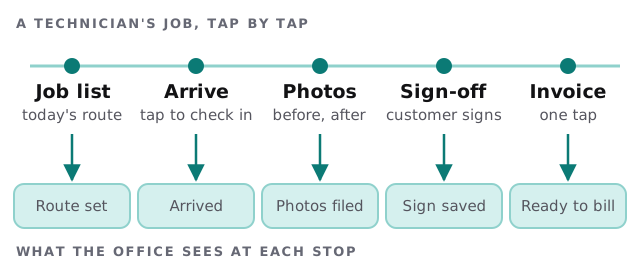
What the technician’s screen needs
- The list. Today’s jobs in order, with the address, the contact and the notes from the last visit.
- A start button. One tap that records arrival and tells the office.
- A short checklist. The steps for this type of job, not a generic form.
- Photos. Taken in the app so they attach to the right job, not lost in a camera roll.
- A signature. Captured on the glass, saved with the date.
- A close-out. Parts used, time spent, and anything for a follow-up visit.
If any of these needs more than a thumb, it will be skipped by the second week.
When there is no signal
Basements, plant rooms and rural roads are where a lot of field work happens, and a screen that spins while a customer waits is worse than paper. The web platform has a standard answer. MDN explains that a service worker can store resources in a local cache and answer requests from it, so an app can keep working offline. For sending results afterwards, Background Sync lets the app ask its service worker to run a task once the device has connectivity.
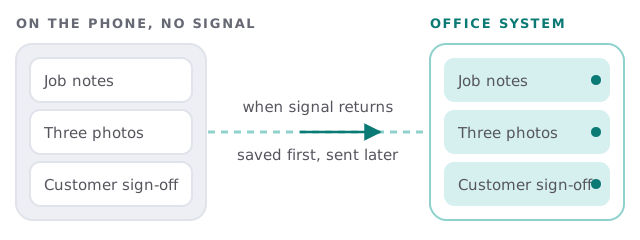
There are limits worth knowing. MDN notes that caching strategies depend on the app, that a cached copy can be stale, and that background tasks have browser-specific time limits. So we design for the worst case: the phone keeps its own record until the office confirms receipt, and anything unsent is shown clearly.
Two screens, two people
| Technician sees | Office sees |
|---|---|
| Today’s jobs and notes | Every job and its status on one board |
| Checklist for this job type | Which checklists are finished or open |
| Camera, signature, a close button | Photos and signatures filed against the job |
| Only their own work | Staff, hours and follow-ups across the crew |
Signs paper has stopped working
- Invoices go out days late because someone is waiting for a sheet.
- You cannot say which jobs are finished without ringing around.
- A customer disputes the work and the before photo cannot be found.
- Two technicians turn up for the same job, or nobody does.
- Your best technician is the only one who knows how a repeat customer’s site works.
Any one of these is a sign you are losing time or money on information that already exists in someone’s head or pocket. The app’s job is to move it to a shared place, with the least effort from the person on site.
Start small, then build
A job tracking app for field crews does not have to begin as software. If you have not tracked jobs digitally before, a shared base in a tool like Airtable can run for a season while you learn what your crews actually use. Our page on an Airtable developer for small business covers that route. Build the custom app when the spreadsheet starts getting in the way of the people holding phones.
What we need from you
- A list of your job types and what is done on each.
- Photos or copies of the paper forms crews use now.
- Two technicians willing to try an early version and say what annoys them.
We start with a plan and a fixed quote, and a person on our side tests each stage with your crew before it replaces the paper.
If the app is slower than the clipboard, the clipboard wins. Design for the thumb, the glove and the dead zone.