Late invoices rarely come from customers who refuse to pay. They come from invoices that went to the wrong person, got lost in an inbox, or were waiting on an approval nobody knew about. A gentle, timely nudge fixes most of it, but only if someone remembers to send it. An AI invoice tracking tool is that memory.
Four questions it answers
- What’s outstanding? Everything unpaid, grouped by how overdue it is, with the biggest at the top.
- Has anyone been told? Which reminders went out, when, and whether the customer opened or answered.
- What did they say? Replies read and sorted: promised payment, needs a copy, disputes, no response.
- Who needs a person? A short list of accounts where a phone call will do more than another email.
Reminders that sound like you
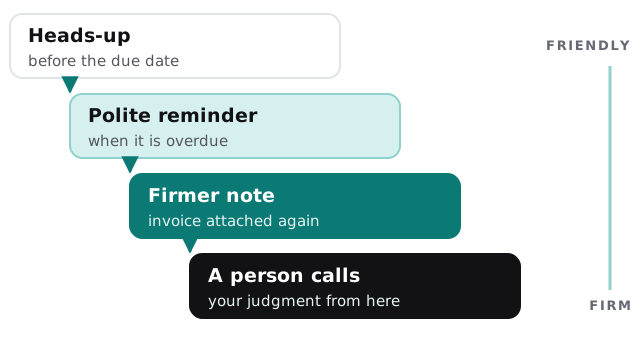
Not every late invoice deserves the same message. The tool follows a ladder you agree in advance, and the wording stays friendly until a person decides otherwise.
What it does and doesn’t touch
| It does | It doesn’t |
|---|---|
| Read invoices and payments from your accounting system | Edit or void anything in your books |
| Draft reminders and queue them for approval | Send to a customer you’ve marked as sensitive |
| Stop automatically when a payment arrives | Chase an invoice marked as disputed |
| Summarise the customer’s reply | Agree to a payment plan or a discount |
| Flag patterns, such as one customer always paying late | Decide to charge fees or stop supply |
Your Monday view
One late invoice, handled
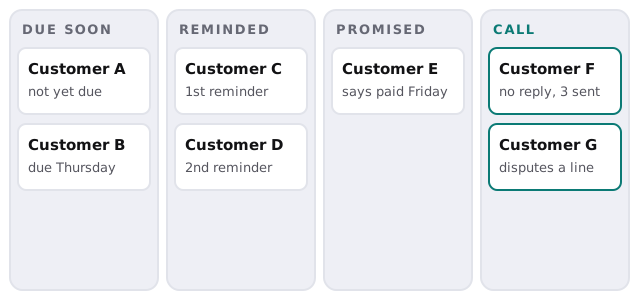
A customer’s invoice passes its due date on a Wednesday. The tool checks the books, sees nothing has arrived, and drafts a short reminder that attaches the invoice again. You approve it in a few seconds. The next morning the customer replies that their accountant has it and will pay Friday. The tool records the promise, pauses further reminders until Friday, and checks again that afternoon. If the payment shows up, it closes the loop quietly. If it doesn’t, you get a note saying so, along with the whole thread.
That’s what unpaid invoice follow up automation should feel like: you hear about the exceptions, and the routine ones sort themselves out.
Signs you need it
- Overdue invoices come up only when cash gets tight.
- Reminders happen when somebody has a free hour.
- You can’t say which customers pay reliably.
- Awkward chasing falls on whoever dislikes it least.
The edge cases are the job
Most of the value is in situations a simple scheduler gets wrong:
- A customer paid, but the payment hasn’t been matched yet, and the reminder would embarrass you.
- An invoice went to a contact who left the company.
- Part of an invoice is disputed and the rest is fine.
- A credit note is open against the invoice.
- A customer says “it’s with accounts payable” and means it.
For each, the tool pauses and asks, rather than pressing ahead on a rule.
How we’d set it up
- Connect read-only access to your accounting software.
- Agree the ladder. How many reminders, how far apart, how each should read.
- Mark the sensitive accounts that always get a personal touch.
- Run it in draft mode for a while, so a person reviews every message.
- Loosen carefully, letting routine, friendly reminders go on their own once you trust them.
Rather build it yourself?
Accounting products have their own basic reminders, and it’s worth switching them on first. Our guides to setting up QuickBooks Online and setting up Xero cover getting your invoicing tidy. The tool we build adds the reading of replies, the per-customer judgment and the hand-off to a person.
Late payment is usually a communication problem before it’s a credit problem. Fix the communication first.