Most small companies already have the answers. They sit in a handbook nobody opens, a shared drive nobody can search, and the head of the one person who has been there longest. An AI knowledge base for employees puts a question box in front of all of it. It works as an internal AI assistant for company documents: your team asks, it reads, and it replies with the answer and the file behind it.
Where the questions come from
Think about the interruptions in a normal week:
- “Which form do I use for a refund?”
- “What’s our line on late deliveries?”
- “Where’s the latest price sheet?”
- “How do I reset the shared printer?”
Each is small. Together they pull your most experienced people away from their own work, again and again. The goal is to let them keep answering the questions that really need them.
How an answer gets made
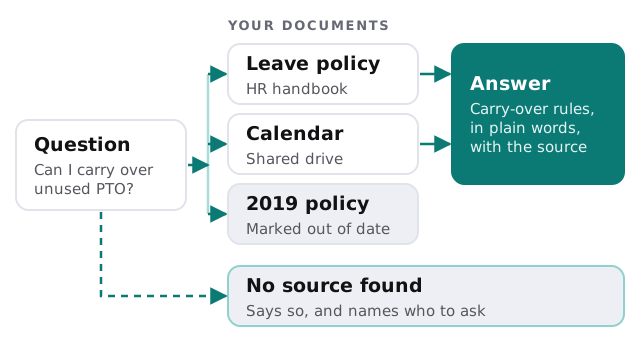
- Someone asks. In a chat window, or in the channel your team already uses.
- The tool searches your files. Only the folders you’ve connected, and only the ones that person may open.
- It writes a short answer. In plain words, from what it found, not from general knowledge.
- It shows the source. The document and the section, so the reader can check in ten seconds.
- If there’s no match, it says so. Then it names the person or channel to try.
What it should and shouldn’t read
| Good to connect | Handle with care | Leave out |
|---|---|---|
| Handbook, procedures, checklists | Contracts and client files | Payroll and personal records, unless HR wants them in |
| Price lists, product sheets | Draft documents still being edited | Passwords or shared logins stored in documents |
| Meeting notes that record decisions | Old versions of anything | Anything under a legal hold |
Who sees what
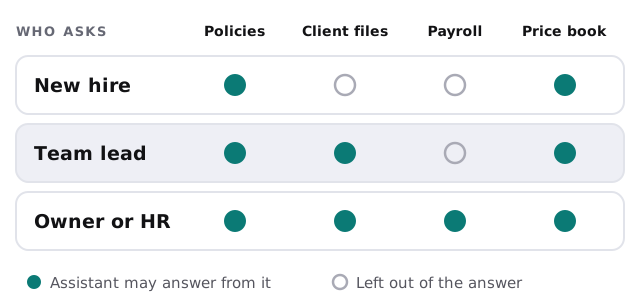
Search across company files is where a careless setup leaks. A tool that reads everything and answers anyone will happily tell an intern what the director earns. We build it so the assistant checks the asker’s access first, then searches only what that person could open themselves.
Keeping it right after launch
An assistant is only as current as the files behind it. Three habits keep it honest:
- Name an owner for each folder. One person is responsible for it staying accurate.
- Retire old versions. Move them to an archive folder the tool ignores.
- Read the questions it couldn’t answer. That list is a free to-do list of documents you never wrote down.
A Tuesday with it in place
A new coordinator starts. By 10am she has asked six things: the refund form, the dress code, how to log a complaint, where invoices go, who approves overtime, and what to say when a client asks for a discount. Five come back with a source. The sixth, the discount question, returns “no document covers this” and points her to the owner. Nobody was interrupted, and the owner learns there’s a gap in the handbook.
Rather build it yourself?
If you mostly want a general assistant for the team and your files are already tidy, start with our guide to choosing an AI assistant for your team. A custom build earns its place when you need permissions mapped to your folders, a record of what was asked, or sources that must be cited every time.
What we need from you
- A list of the folders that hold your real answers.
- Who may see what, even as a rough sketch.
- The ten questions people ask most, so we can test against them.
We start with a plan and a fixed quote. A person approves what the tool is allowed to read before it goes live.
The best answer from an internal assistant is sometimes “that isn’t written down yet, ask Sam.”