A sheet is a wonderful first system. Anyone can start one in an afternoon, and it bends to whatever the business needs this month. That flexibility is also the problem. Nothing stops a cell from holding a date in one row and the words “next Tuesday” in another.
A Google Sheets to database migration moves the same information into a structure that enforces rules. It does this without taking away the parts of the sheet your team likes.
Five rungs on the ladder
Most teams climb these in order. The first two are annoying. The last three are risky.
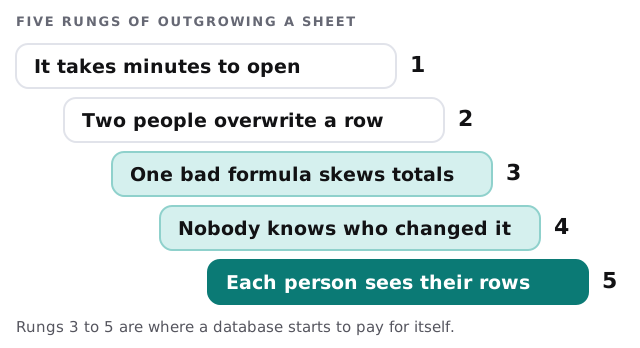
Google lists a ceiling for any spreadsheet in Sheets: up to 20 million cells or 100MB. A sheet with 25 columns reaches that at 800,000 rows. Few small businesses get there. They run out of patience long before, which is why the real signs are behavioural rather than numeric.
How the move runs
- Read the sheet like a stranger. We open every tab, hidden column and protected range, and list what each one is for. The tab named “Copy of Master (old)” gets a question mark.
- Name the things. Customers, jobs, invoices, assets: each real-world thing gets its own table. A tab that mixes two things is split.
- Clean before moving. Duplicates are merged with your say-so. Mixed formats, such as phone numbers typed four ways, are standardised. Blanks that mean “unknown” are marked differently from blanks that mean “none”.
- Turn formulas into rules. We write each formula as a sentence, check it with the person who built it, and rebuild it where it belongs.
- Build the screens people use. A form for entry, a list with filters, and a detail page. Not a replica of the grid.
- Run both for a short stretch and compare totals before the old sheet goes read-only.
If the sheet is really a contact list with a pipeline on top, our notes on moving an Excel file into a CRM cover the same ground for sales data. For anything stranger, a custom internal tool is usually the destination.
Habits the sheet allowed, and what replaces them
| In the sheet | In the database |
|---|---|
| Anyone can type anything in any cell | Fields have types, and a date field only takes dates |
| Colour means something, to someone | A status field with a short list of choices |
| Two tabs hold the same customer | One customer record, linked from both places |
| Edit history exists, but nobody reads it | Each change is logged with who and when |
| Everyone sees every row | Each role sees what it needs |
| Deleted a row by accident | Records are archived, not erased |
What the sheet is still good for
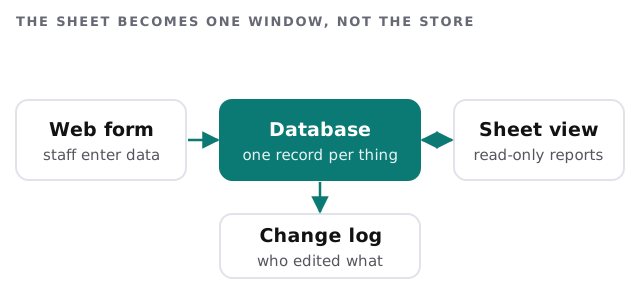
Keeping Sheets in the picture is often the kindest option. People love a grid for quick sorting, for a one-off pivot, for pasting a list from an email. The only change is direction: data flows out of the database into the sheet, not the other way.
A morning, afterwards
Someone logs a new job from their phone. The office sees it on the list within seconds. The manager opens the Monday summary, which is still a sheet, but it was filled automatically overnight. Nobody asks whose version is current, because there is only one.
Moving to a database is not about abandoning the spreadsheet. It’s about making sure one place holds the truth, and the spreadsheet is allowed to be a very good window onto it.
What we need from you
- Edit access to the sheet and a list of who uses it for what.
- The person who built the formulas, for twenty minutes.
- A decision on what counts as a duplicate customer.
- One quiet week to run both versions side by side.