A Microsoft Access to web app migration usually starts the same way. Someone built the database years ago, it ran the business quietly, and then the builder moved on. Now it’s the file that nobody dares reorganize, and a thing that opens slowly when two people use it at once. If you want to replace Microsoft Access database dependence, the work is less about the data and more about the habits wrapped around it.
Signs the file has done its job
- Two people editing at once means someone gets a lock message.
- You keep copies named “final_v3” in case the main file breaks.
- It only works on the one machine that has the right Office version.
- The person who understood it has left.
- You want to use it from a phone or from outside the office.
- It’s creeping toward the size ceiling.
On that last one, Microsoft’s Access specifications give 2 GB per database file. That’s generous for text and numbers, and tight for anything with attachments. The documented answer is to link tables across several files, which is exactly the kind of patch that makes a database harder to understand.
What becomes what
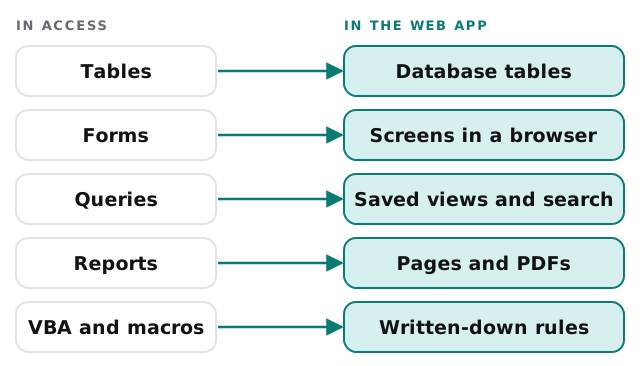
How the move goes
- Inventory. Every table, form, report, query and macro, with a note on who uses it and how often. Files like this usually hold forms and reports nobody opens any more, and those don’t need rebuilding.
- Interview the users. Ten minutes with the person who runs the Monday report tells us more than the file does.
- Write down the rules. Anything VBA or a macro does becomes a sentence a person can check: when this is saved, that gets updated.
- Move the data. Tables go into a proper database. We clean as we go: duplicate customers, dates stored as text, codes that mean three things.
- Rebuild the screens people use, starting with the one used every day.
- Run both side by side for a short stretch, comparing totals, before the old file goes read-only.
One file against one database
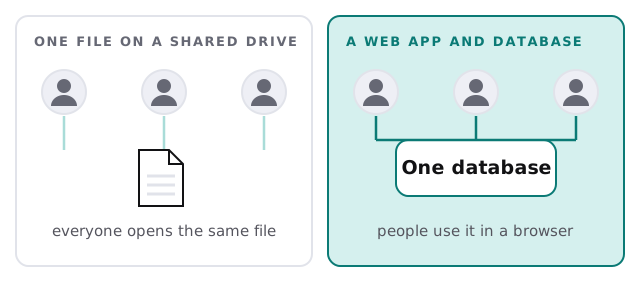
What you gain, and what you give up
| Access file | Web app | |
|---|---|---|
| Who can use it | People with the right Office installed | Anyone with a browser and a login |
| Two people at once | Works until it doesn’t | Built for it |
| Permissions | Mostly all or nothing | Per person or per role |
| Change history | Whoever remembers | Recorded |
| Quick one-off query | Open the file and build one | Ask us, or use a saved view |
That last row is the real trade. Access lets a confident staff member build a new query in the afternoon. A web app can too, but through screens we’ve agreed on first. We keep the ones people use daily simple and add search and export for the rest, so the ad-hoc work doesn’t disappear.
A week in the life afterwards
On Monday morning the person who used to open the file at 8:00 opens a link instead. The weekly report is a page, not a macro. A new starter gets a login with the right permissions rather than a copy of the file on a USB stick. When someone asks “who changed this customer record?”, there is an answer. None of that is dramatic, which is the point.
What we need from you
- A copy of the Access file (not the live one) and any linked data sources.
- Two or three people who use it, for a short conversation each.
- A list of the reports you’d be upset to lose.
- A decision on who approves changes to the rules afterwards.
If part of the file is really a spreadsheet in disguise, setting up Zapier for your team is a gentler first step for moving a single recurring task out of it.
Don’t migrate the file. Migrate the work the file does. The screens are the easy part; the rules are the point.