AI automation for accounting firms is mostly about one problem: the work stalls waiting on clients. A return that needs six documents sits idle until the sixth one turns up, and someone on your staff spends part of every week asking for it.
Our approach is to automate the waiting, not the judgment. Tools do the sorting, matching and first drafts. A person who is licensed and accountable approves everything that goes out.
Where the hours actually go
Ask any manager what eats their winter and the answers are alike:
- Emailing clients for the same missing 1099 or brokerage statement.
- Renaming scanned files so they match the client folder.
- Answering “did you get my stuff?” by phone and email.
- Reading IRS and state notices to decide who needs to see them.
- Writing review notes that say the same thing on forty returns.
None of that is advice. All of it is text, files and lists, which is exactly what current AI tools handle well.
The document chase, without the chasing
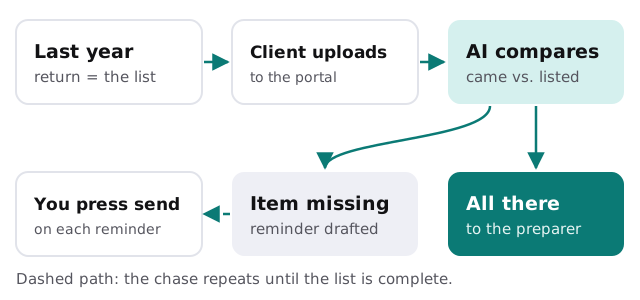
Last year’s return tells you what this year’s file should contain. A tool can turn that into a checklist, compare each upload against it, and draft a short, specific reminder: “Still missing the 1099-INT from your savings account.” You read it and press send. The rest of the file waits in a clear status, so nobody has to open it to find out why it’s stuck.
What we’d build first, and what we’d leave alone
Good first builds
| Task | What the tool does | Who decides |
|---|---|---|
| Intake checklist | Builds it from the prior-year return | The preparer |
| Upload sorting | Names and files documents into the client folder | Staff spot-check |
| Notice triage | Summarizes a letter and says who should read it | The manager |
| Status answers | Drafts a reply from the file’s current state | Whoever sends it |
| Review notes | Drafts comments for the usual issues | The reviewer |
Leave these alone
- Anything that changes a number on a return without a person looking at it.
- Messages sent to clients with no approval step.
- Tax positions and advice of any kind.
Plan it around your calendar
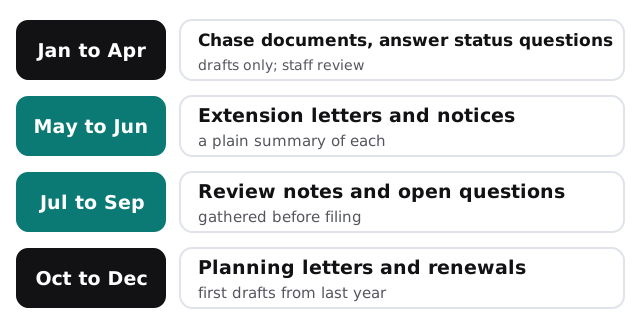
The IRS sets individual returns for April, with an extension to October 15. Your own year has more edges than that, because partnerships, corporations, payroll forms and estimated payments all keep their own dates. Build and test new tools between busy periods, not during them.
The software it connects to
Most firms run some mix of three categories: tax preparation software, a practice management or workflow tool, and bookkeeping software such as QuickBooks Online or Xero. A custom AI tool reads from these through their own sign-in and writes only into places you name. If you’d rather start smaller, our guide to setting up Dext for your team covers receipt and bill capture, and setting up QuickBooks for your team covers the bookkeeping side.
What it looks like in the middle of February
A client uploads half their documents on a Sunday night. By Monday morning the file is sorted, the missing items are listed, and a reminder is waiting for the preparer, who reads it with their coffee and sends it. The same afternoon, an IRS letter lands in the shared inbox. It has been summarized in two sentences, matched to the client, and routed to the manager. Nobody typed a thing.
Questions to ask any AI consultant for an accounting firm
- Which of my systems will the tool read, and which can it write to?
- Where does a person approve before anything leaves the firm?
- What happens when the tool is unsure?
- Can I see a log of what it did on a given client?
- Who do I call when it misbehaves in March?
We’ll answer those on the free IT check, then give you a plan and a fixed quote. A real person replies within 1 business hour, Monday to Friday, 9am to 5pm Pacific.
Automate the waiting, not the judgment. A partner’s signature should never be the thing a tool replaced.