AI automation for architecture firms is easiest to justify in the phase where design turns into paperwork. Drawing and thinking are the work you trained for. Searching a large sheet set for one note, then logging the answer, is not.
The tools we’d build sit around your design software, not inside it.
Where the paper piles up
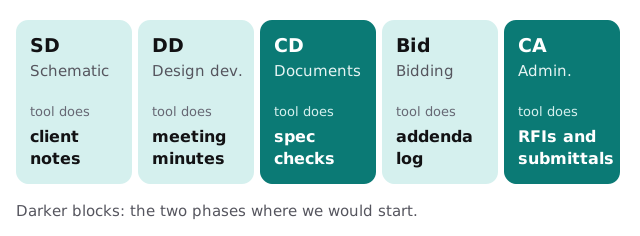
RFIs: find first, answer second
A contractor asks, “Does the door schedule match the hardware on sheet A-501?” Somebody has to find the sheets, the spec section and any addendum that touches them, and only then think about the answer.
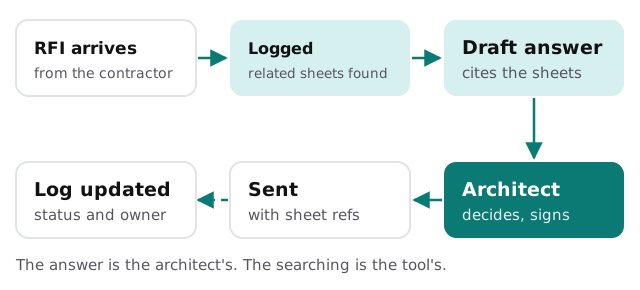
- Logged on arrival. The RFI from the email or the contractor portal is entered with a number, a date and a due date.
- Related material surfaced. The tool searches your sheet index, specs and prior RFIs, and lists the likely matches with sheet numbers.
- A draft is written. It quotes the relevant note or section and flags where the documents conflict.
- The architect decides. They read the sheets themselves, change what they disagree with and sign off.
- Everything is recorded. The final response, the sheets cited and the date go back into the log.
Other chores with the same shape
- Submittal tracking. Compare an incoming submittal with the spec section and list what’s missing, such as a data sheet or a finish sample.
- Meeting minutes. Turn a recorded coordination call into decisions, action items and owners, for the project architect to correct.
- Consultant coordination. Spot changed sheets between issues and draft the notice to the structural and MEP consultants.
- Spec cross-checks. List places where product names or section numbers differ between the specifications and the drawings.
- Proposal drafts. Assemble a first draft from past project descriptions and your standard language.
Your software, by category
| Category | Familiar examples | Where a tool plugs in |
|---|---|---|
| Design and BIM | Revit, ArchiCAD | Leave it alone; read exported sheets and schedules |
| PDF markup and review | Bluebeam | Search text, collect markup comments |
| Project and time tracking | Deltek, Monday and similar | Draft updates, check budgets |
| Document storage | File servers, SharePoint | Index and find the right file |
| Email and chat | Outlook, Teams | Pull decisions into the project record |
We don’t claim to integrate any of these by name. The free IT check shows what your setup lets an outside tool read.
A Thursday during construction
The contractor emails two RFIs and a submittal before nine. By ten, each is logged, linked to the drawings it concerns and waiting as a draft in the project architect’s queue. She rewrites one answer, because the note on A-501 was superseded by an addendum the tool had listed but didn’t weigh correctly, and approves the other. The searching shrank and the judgment stayed. That’s the trade, and it is the whole point of the tool: she spends her morning deciding things instead of hunting for the page that lets her decide.
Rules we’d put in writing
- Every answer cites sheet or section numbers, so it can be checked in seconds.
- The tool says when documents conflict instead of picking one.
- Nothing is sent to a contractor or consultant without the architect’s approval.
- Client drawings stay in systems you control, and access is limited to the project team.
Where to begin
Pick the project with the heaviest administration and tell us how RFIs, submittals and minutes are tracked today. We return a plan and a fixed quote after the free IT check. A real person replies within 1 business hour, Monday to Friday, 9am to 5pm Pacific.
An architect’s judgment is the product. Everything between the question and that judgment is overhead.