Managed IT services for accounting firms look a lot like managed IT anywhere else, until you hit two things most businesses don’t have. One is a calendar where a broken server in March costs far more than the same fault in July. The other is a federal rule that tells you, in some detail, how client financial information must be protected.
The rule that covers your firm
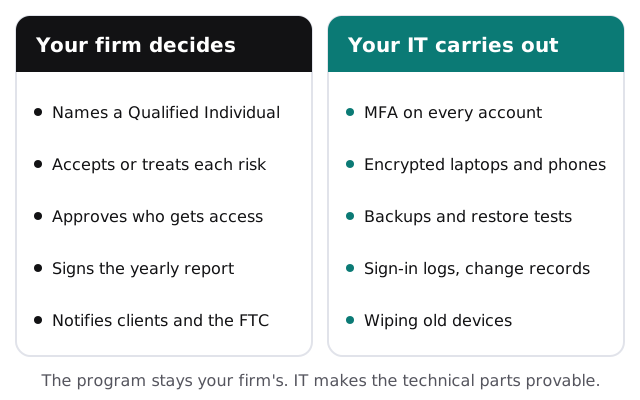
The FTC’s Safeguards Rule names tax preparation firms among the businesses it applies to. It requires a written information security program and spells out what that program has to contain. Not all of it is technical: someone has to own the program, and someone has to report on it. But most of it is carried out through your systems, which is where an IT provider earns its keep.
Two details are worth knowing early. Firms that keep customer information on fewer than 5,000 consumers are exempt from some of the rule’s provisions, so check which apply to you before assuming the full list does. And if a security event exposes unencrypted information on 500 or more consumers, the FTC must be told no later than 30 days after you discover it.
What the rule asks for, and the IT work behind it
| What the rule asks for | The IT work that makes it real |
|---|---|
| A Qualified Individual who runs the program | Reports and records from your systems that this person can rely on |
| A written risk assessment | A current list of devices, accounts, data locations and who can reach each |
| Access controls, encryption and multi-factor sign-in | Multi-factor on every account, access limited to what each role needs, encrypted laptops and phones |
| A data inventory and secure disposal | Knowing where client files live, and wiping devices before they’re retired |
| Change management and activity logs | Recorded changes, and sign-in logs kept where they can be reviewed |
| Monitoring and testing | A yearly penetration test and vulnerability scans every six months, unless systems are monitored continuously |
| Staff training | Short, regular refreshers on phishing and passwords |
| Oversight of service providers | A list of every vendor that touches client data and what each can reach |
| A written incident response plan | Who to call, what to switch off, and how to restore from backup |
| A yearly written report to the board | The system facts that feed the Qualified Individual’s report |
Monthly care covers the access controls, backups and updates the whole program depends on. On the free IT check we walk through this table with you and mark what your setup already does and what’s missing.
An IT calendar built around the filing year
| When | What IT should be doing |
|---|---|
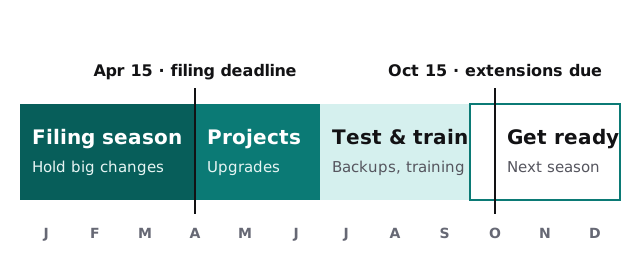
| January to mid-April | Hold big changes. Security updates still go out, tested after hours. Support requests jump the queue. |
| Late April to June | The window for real projects: new computers, software upgrades, network work, office moves. |
| July to September | Restore test from backup, security review and a staff refresher before extension season. |
| October to December | Update the written program, renew licenses and install next season’s tax software early. |
Firms that run on this rhythm stop finding out about expired licenses and failed backups in the busiest week of the year.
Questions to ask any managed IT provider
- How fast does a real person reply in the middle of March?
- Will you tell us in writing which parts of the Safeguards Rule your work supports, and which stay with us?
- When did you last restore a client’s files from backup, and how long did it take?
- How do you remove someone’s access on the day they leave?
- Which tax and practice software have you supported?
- What’s included each month, and what gets billed separately?
Ask us the same six. You should get plain answers from anyone you’re considering.
The Safeguards Rule covers your firm’s whole program, not just its computers. A good IT provider makes the technical parts easy to prove, but the program stays yours.