Client document collection for accounting firms usually fails at the client’s end, not the firm’s. The firm sends a long email listing documents by their form names. The client opens it on a phone between meetings, can’t tell which of the six things they have, and replies with two photos and a question. Three weeks later, someone on your team sends the same list again.
Design it from the client’s chair
Before any tool, look at the request the way a client does. They want three things: what do you need, how do I send it, and am I done yet?
What we put in place
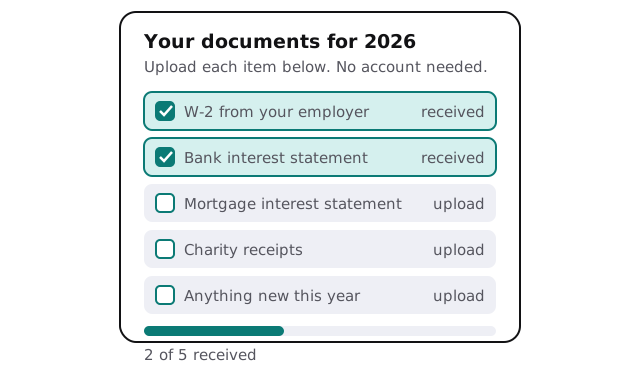
- A checklist for each client, written in their words (“your mortgage interest statement”) rather than yours (“Form 1098”).
- A single upload link, so the client doesn’t need a login to hand something over.
- An automatic filing step. Each upload is named, put in the client’s folder and ticked off. Unreadable or wrong files are flagged for a person.
- Reminders from you, not from a machine. They carry the client’s name, list only what’s still missing, and arrive at a pace you choose. A preparer can read them first.
- A status view for your team, with clients grouped as complete, partial or silent, so the follow-up goes where it’s needed.
- A handover to the preparer once the checklist is complete, with nothing further to open.
Questions about the portal itself
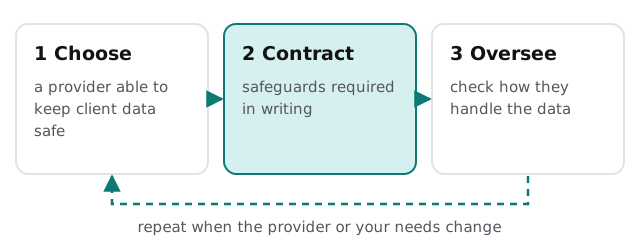
Because the files are sensitive, the tool you collect them with is part of your security story, and the IRS is specific about that. Its guidance for tax preparers says a written data security plan is required by federal law and points to the FTC’s Safeguards Rule. Among the plan’s elements: pick service providers that can maintain proper safeguards, require them to do so by contract, and oversee how they handle customer information.
For a firm without a plan yet, the IRS points to its Publication 4557, Safeguarding Taxpayer Data, as a starting place. Writing the plan is yours to own; we’ll describe how any tool we build for you handles data so your plan can say so accurately.
Signs the current approach is costing you
- The same client has been asked for the same item three times.
- Documents live in email inboxes, text messages and a shared folder at once.
- Someone keeps a private spreadsheet of who has sent what.
- You can’t say, today, how many clients are still missing anything.
- Staff ask clients to “email it to me” because the portal is too fiddly.
A comparison
| Email and phone chasing | Collection link with checklist | |
|---|---|---|
| Client’s effort | Read, search, reply, attach | Tap, upload, see the tick |
| Where documents end up | Wherever the recipient saves them | The client’s folder, named consistently |
| Who knows what’s missing | Whoever remembers | Everyone, from the status view |
| Reminders | Remembered when someone has time | Scheduled, personal, reviewed |
| Evidence of what was asked | Buried in sent mail | Kept with the request |
What we need from you
- Your current document checklist, however informal.
- A list of typical client types, so the checklists match them.
- Where finished folders should live.
- Who approves reminder wording, and how often you want them to go out.
- A look at your written security plan, if you have one, so our setup fits it.
If you only need a lighter start, setting up Dext for your team covers collecting receipts and bills, which is often the messiest slice.
Clients don’t ignore your requests. They fail to find the thing you asked for. Make it findable and most of the chasing disappears.