Managed IT services for plumbing companies should be dull. A plumber’s trade is full of surprises, so the systems around the work shouldn’t add any. A good setup means the price is the same on every truck, the phone rings where it should and the footage from the pipe camera ends up with the job.
One price, many tablets
Flat-rate pricing only works if everyone uses the same book. When trucks carry old copies, customers get two prices for the same job and the office hears about it.
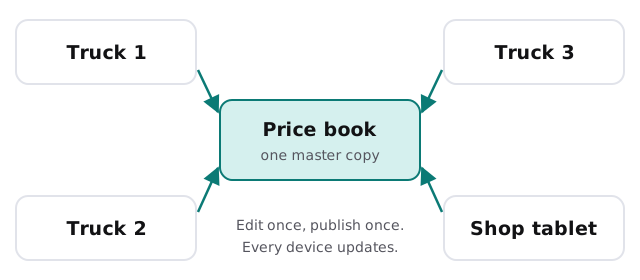
Most field-service tools handle this well when they are set up for it. The usual faults are plain: tablets that haven’t updated the app, editing rights given to too many people and a second copy kept in a spreadsheet because it was easier once.
On-call is a phone setting
Plumbing customers often call when something is already leaking. Many companies share the duty between a few people on a rotation. The rotation itself is a staffing decision. Making the phone follow it is an IT task.
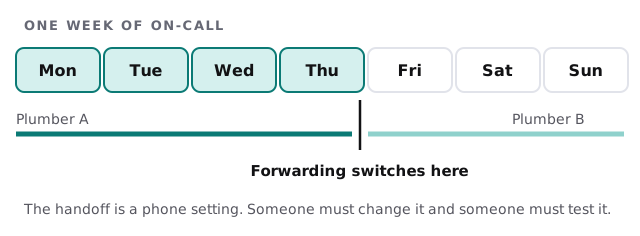
Three small habits prevent most failures:
- Schedule the change, if your phone system allows it, rather than relying on memory.
- Test with an outside call on handover morning.
- Name a backup, so a dead battery doesn’t send customers to voicemail.
We don’t run your on-call and we don’t answer your customers. We make sure the system that routes the calls is set up and understood by more than one person.
What the camera leaves behind
Drain and sewer cameras produce video, and video fills space. Used well, it is proof for the customer and a reference for the next visit. Used badly, it is a memory card in a glovebox.
- Save to the job record from the tablet or upload on return to the shop.
- Name files by job, not by date and a default camera label.
- Keep it for a set time, and decide who can delete.
- Back it up, because video is the one thing you cannot recreate after a pipe has been repaired.
Permits, inspections and dates
Some jobs need a permit and an inspection. The dates matter, since a crew can’t close a wall until the inspector has seen the pipe. Keep those dates in a shared calendar or in the job record, not in one person’s notebook, and make sure the right person gets the reminder. If a municipality uses an online portal, record whose login it is and who holds it.
Van stock and the parts run
Every plumber knows the second trip to the supply house. The best fix is old-fashioned: a stock list for each van, checked at the end of the week. Some companies track it in the field-service tool and others on a simple shared sheet. Whichever you use, make it the single list, with one person responsible for it and a way to see it from the office.
Phones and tablets that live in trucks
Truck devices take drops, heat and water. Choose cases and mounts that fit the work, keep a spare ready to swap and have each device lock itself. When a technician leaves, wipe their device and close their accounts the same day.
What we need from you
- Your field-service, quoting and invoicing tools, and who administers them.
- Your phone and on-call setup.
- Where inspection video is saved now.
- How many devices ride in trucks, and who owns them.
Monthly care covers access controls, backups and updates. The free IT check ends in a plan and a fixed quote.
Everyone should be able to tell a customer the same price. Start by giving them the same book.