The first two weeks with a new client set the tone for the whole relationship. They’re also the weeks when the contract sits unsigned, the intake form comes back half empty, and three people send the same question three different ways. An AI client onboarding app replaces that scatter with one tidy path the client can follow without help.
Where onboarding stalls
It’s rarely the big steps. It’s the small ones that wait on the client: the signature, the ID, the login to their old system, the answers to “who should we contact about invoices?” Each delay is small, but the chasing consumes someone’s week, and the client starts to think you’re disorganised.
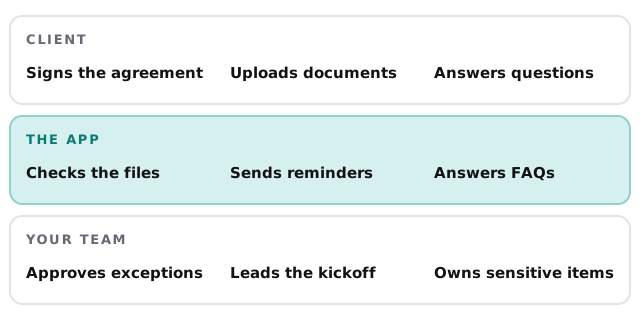
What the app holds
The client’s side
A single page with a short list: sign the agreement, fill in the details form, upload the documents, book the kickoff call. Each item has a plain explanation of why it’s needed. A chat box answers “where do I find this?” from your own guidance, and says so honestly when it doesn’t know.
Your side
A board of clients and their stages. Each card shows what is outstanding, how long it’s been waiting, and the last message. You see problems before the client has to tell you about them.
What the AI checks
| Step | What it looks at | What happens if it’s wrong |
|---|---|---|
| Uploaded ID or certificate | Right document type, legible, not expired | Client is asked again, with the reason |
| Details form | Missing or inconsistent answers | Specific follow-up question, not “please complete” |
| Signed agreement | All signature and date fields completed | Flagged to you before the work starts |
| Access and logins | Credentials supplied through a secure route, never in chat | Client is pointed to the safe method |
The stages a client moves through
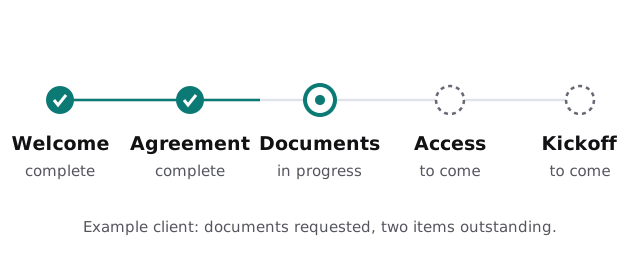
- Welcome. A friendly message with what happens next and what they will need.
- Agreement. Signature and any questions about the terms, which a person answers.
- Information. Details form and documents, with reminders that are polite, specific and spaced out.
- Access. Systems or accounts you need, requested in a secure way.
- Kickoff. The call is booked and the notes from everything above are ready for it.
Here’s what Monday looks like
You open the board. Three clients are on track. One has had a signature outstanding for four days, and the app has already sent two reminders, so you phone instead. Another uploaded a document that turned out to be last year’s version, and the app asked for the current one before you ever saw it. You spend your morning on the conversations that need you. To automate client onboarding is mostly to make that Monday possible.
Signs you need this
- You keep a spreadsheet to remember who still owes you a document.
- Clients email the wrong person because they don’t know who to ask.
- Your best people spend Friday afternoons chasing signatures.
- Each new client gets a slightly different experience, depending on who handled them.
Rather build it yourself?
Some of it you can stitch together from tools you already have. Our guides to setting up Zapier and setting up Make show how to chain together a form, a folder and a reminder. We build the app when you want the client to see one tidy page, and you want one reliable view of every client.
What we need from you
- Your current onboarding steps, written down however roughly.
- The documents and forms a client has to provide.
- Which steps must always involve a person.
- Two or three recent clients whose onboarding went badly, so we build for the awkward cases.
We write a plan and a fixed quote, and a person on your team approves each automated message before it is ever sent to a real client.
A client who knows what’s next, and what you’re waiting on, rarely needs to chase you.