A small support team answers the same dozen questions over and over: where’s my order, what’s your returns policy, do you ship to my area. An AI customer support chatbot for small business can take those off the pile, as long as it’s honest about where its knowledge ends. The ones that go wrong are the ones that bluff.
What it should answer, and what it shouldn’t
| Good for the chatbot | Better for a person |
|---|---|
| Opening hours and locations | A complaint from an upset customer |
| Shipping, returns and warranty policy | Anything that needs a refund or exception |
| How to use or set up a product | A billing dispute |
| Order or booking status lookups | Medical, legal or safety questions |
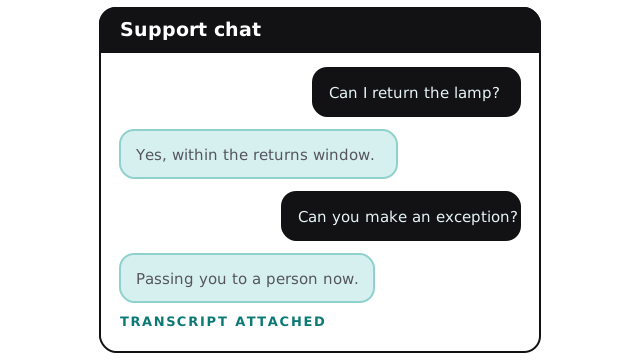
| “Which option suits me?” from your own guide | Anything the customer asks to take to a human |
The left column is where most of the volume sits, and where an AI FAQ chatbot for website visitors earns its keep.
A conversation that works
Where its answers come from
The chatbot is only as good as what you feed it. A sensible knowledge base for a small business is short:
- Your policies, in plain language.
- A page for each product or service.
- Your most common questions with the answers you’d actually give.
- Anything customers misunderstand, written down once.
We help you write the missing pieces, because gaps in the material are the usual reason a bot underperforms.
Setting it up, step by step
- Collect the real questions. From email, chat logs and calls over the last few months.
- Write or tidy the answers. One clear page per topic.
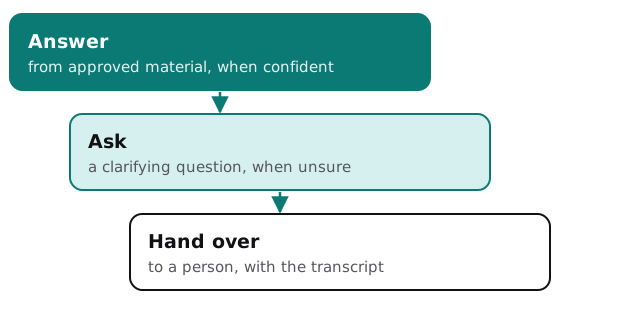
- Set the boundaries. Topics it must never discuss, words it must never use, and when it must hand over.
- Connect the handoff. To your inbox, help desk or phone so a person sees the whole chat.
- Test with awkward questions. Trick questions, angry messages, and requests it shouldn’t grant.
- Go live quietly. On one page first, and read the transcripts daily at the start.
The ladder it follows
Measuring whether it helps
Look at the things that show real service quality:
- Did the visitor’s problem get solved, or did they come back by email anyway?
- Which questions did the bot hand over, and why? Those become your next articles.
- Do customers who reach a person arrive with the context, or have to repeat themselves?
If handoffs are rising, the knowledge base has gaps. If complaints are rising, the bot may be answering things it shouldn’t.
What the first week looks like
Expect surprises. Customers ask things you never listed, in words you didn’t expect, and the bot’s “I don’t know” list becomes the most useful page you own. Read it each morning. Every entry is either a missing answer to write or a question that should always go to a person. After a week or two the list shortens, and you’ll know which topics are safe to leave alone.
Be clear it’s a bot
Say so at the start of the chat. It builds trust and avoids the awkward moment when someone notices. Let them ask for a person at any time, and keep that option visible.
Rather build it yourself?
Several help-desk products now include a chatbot, and our guides to setting up Tidio, Intercom and Help Scout walk you through getting one running. We get involved when you need it to look up orders in your own systems, follow rules specific to your business, or sit in front of a help desk it wasn’t designed for.
A chatbot that says “let me get a person” at the right moment is better than one that answers everything.