In most small businesses, approval is a thing that happens in a hallway. “Can I order the new laptop?” “Sure.” Three weeks later, nobody can say who agreed, what it cost, or whether it was within budget. An AI approval workflow for small business keeps the hallway conversation, but writes it down and makes sure the request doesn’t get lost.
What’s wrong with approvals by email
- The request sits unread in a busy inbox.
- The approver lacks the quote, so they reply with a question.
- There’s no deadline, so nothing is overdue.
- The “yes” is a thread nobody can find at year end.
- Rules live in the owner’s head, so the answer depends on who’s asking.
Three shapes of approval
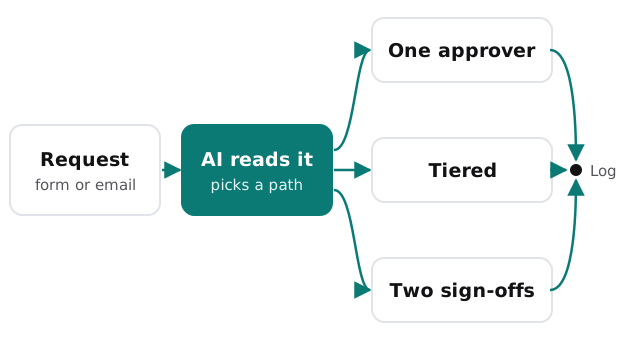
One person, yes or no
Time off, a small purchase, a content sign-off. A request goes to a named person, who taps approve or decline. This is the easiest one to automate and the most common.
Tiers by size or type
Small spend goes to a team lead, bigger spend adds the owner, and anything unusual adds your bookkeeper. You set the thresholds yourself, and they are easy to change later.
Two sign-offs
Contracts, price exceptions and payments to new suppliers often need two people. The workflow asks both, in order or together, and only proceeds when both have said yes.
What the AI actually does
- Reads the request. Form, email or chat message, plus any attachment.
- Fills in the gaps. Amount, supplier, budget line, and the date it’s needed by.
- Checks it against your rules. Does it match a known supplier? Is it already budgeted? Is it a duplicate?
- Writes the summary. Two or three lines for the approver, with the unusual part highlighted.
- Routes and tracks. Sends it to the right person and starts the clock.
None of that is a decision. It’s the preparation that makes a decision quick.
A purchase request, start to finish
Dana in the office asks for a new printer. She attaches the quote to a short form. The AI reads the quote, notes the supplier and the total, sees it’s under the team lead’s limit, and sends it to the team lead with a two-line summary. The lead taps approve on their phone. The order task goes to whoever buys, and the record shows who agreed and when. Dana hears back the same day instead of asking twice in the corridor.
If the quote had been over the limit, the same request would have gone to the owner as well, with no one needing to remember that rule.
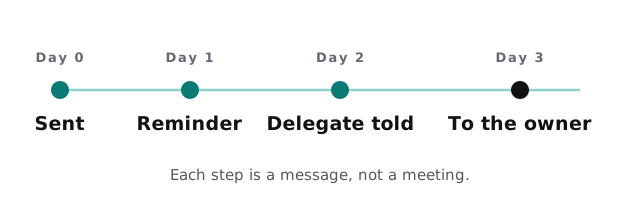
When nobody answers
Most stalled approvals aren’t refusals. They’re forgotten. A workable pattern:
What the record should hold
| Field | Why it matters later |
|---|---|
| Who asked, and when | Establishes the request date |
| What they asked for | Includes the attachment, not just the title |
| Who approved or declined | Shows the person, not “the team” |
| Reason or comment | Makes the decision understandable a year on |
| Time taken | Shows where approvals get stuck |
Questions to ask before building one
- Which five kinds of request cause the most chasing?
- Who can approve each, and who covers when they’re away?
- Which requests must never go through without two people?
- Where should people make the decision: chat, email or a page?
Rather build it yourself?
If your approvals are simple, a workflow tool will do. Our guides to setting up Power Automate and setting up Zapier both cover getting a first automation running. We step in when the rules have branches, when attachments need reading, or when the record has to be trustworthy enough to rely on.
Automating the chasing is easy. Deciding who is allowed to say yes is the real work, and it’s worth doing first.