Every small business has a handful of jobs that only one person really knows how to do. Month-end close. Opening the shop. Setting up a new customer. When that person is on holiday, or leaves, the job becomes a guessing game. An AI SOP generator for small business gets that knowledge out of one head and onto the page, without asking anyone to spend a weekend writing a manual. It turns processes into step by step guides that stay short enough to be read.
Three ways to capture a process
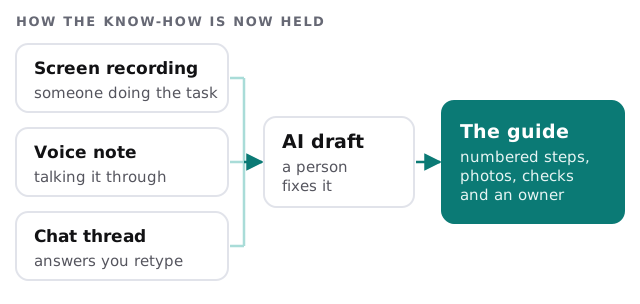
You don’t write the guide. You show or tell the tool how it’s done.
- Record your screen. Do the task as normal while talking through it. The tool turns the clicks and the commentary into steps.
- Talk it through. For jobs that happen off-screen, such as unlocking the shop or checking in a delivery, a voice note of someone walking through it is enough.
- Point at a chat. If you keep retyping the same answer to the same question, the thread itself is the raw material.
What a usable guide looks like
Plenty of procedures exist and nobody reads them, because they’re long, vague or out of date. A guide people actually use tends to be:
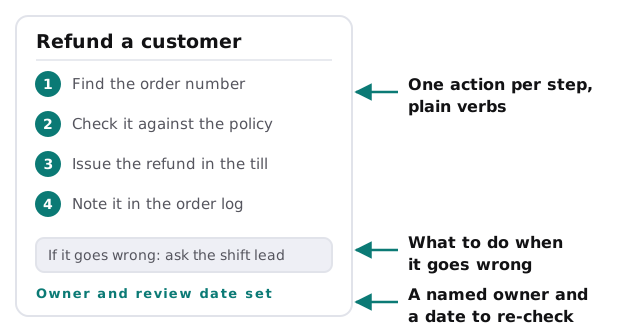
- Short. One job, one page.
- Concrete. “Click Refund, then choose the order” and not “process the refund”.
- Visual where it helps. A cropped screenshot saves a paragraph.
- Honest about trouble. It says what to do when the usual path fails.
- Owned. It names who keeps it right.
Where AI helps and where it doesn’t
| It’s good at | It can’t do |
|---|---|
| Turning a recording into numbered steps | Know which step is actually critical |
| Cropping and labelling screenshots | Spot a step you do from habit and forgot to say |
| Keeping the format identical across guides | Decide who should be allowed to do the job |
| Drafting a short checklist from a long guide | Know that your process changed last week |
Test it on someone new
The best check is cheap. Give the draft to a person who has never done the job and watch where they stop.
- Where they hesitate, a step is missing or unclear.
- Where they ask a question, the answer belongs in the guide.
- Where they skip ahead, a step may be unnecessary.
Fix those spots, and you have a guide that works for someone other than its author.
Keeping guides alive
A procedure goes stale the day something changes and nobody edits it. Three small rules prevent most of that:
- Every guide has one owner. A name, not a team.
- Every guide has a review date. The owner gets a prompt, and confirms or edits.
- Changes get noted in the guide. A one-line “what changed” at the bottom is plenty.
Signs you need this
- Only one person knows how to run a particular job.
- You’re training new hires by shadowing, and it takes months.
- The same mistakes repeat because nothing is written down.
- You’re thinking about selling the business or stepping back from it.
Rather build it yourself?
If your team already works in a notes tool, an AI feature built into it may draft procedures well enough. Our guide to setting up Notion AI for your team shows what’s possible there. A custom setup earns its keep when you want recordings turned into guides in a consistent format, filed in the right place, and tracked for review dates.
What we need from you
- A list of the five jobs that scare you if the person leaves.
- Permission to record someone doing each one.
- A place where guides should live.
We make a plan and a fixed quote first. A person checks every draft against the real task before it’s shared with the team.
If a job lives in one person’s head, it isn’t a process yet. It’s a risk.