An empty appointment slot is a cost you can’t get back. The customer simply forgot, or couldn’t find the booking link to change it, or was unsure they’d been confirmed at all. Appointment reminder automation fixes the quiet part of that problem. It’s how you reduce no shows automatically, without anyone at the front desk sending texts one by one.
A schedule that matches how people behave
There isn’t one correct timetable. A haircut and a boiler service need different warnings. But most schedules share the same four beats.
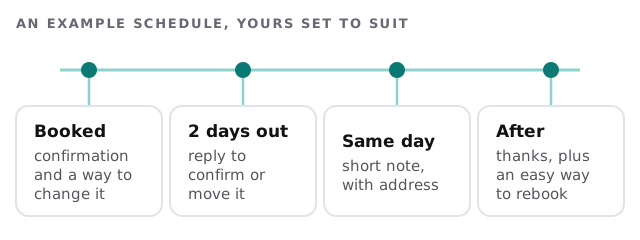
- At booking. A confirmation with the date, place and a link to change it.
- A couple of days before. Asks for a yes. This is the one that matters most, because there’s still time to refill the slot.
- On the day. Short, with the address and any arrival detail.
- Afterwards. A thank-you, and an easy way to book again.
The replies are the clever part
Sending a text is easy. Doing something sensible with the answer is what separates automation from a bulk message tool.
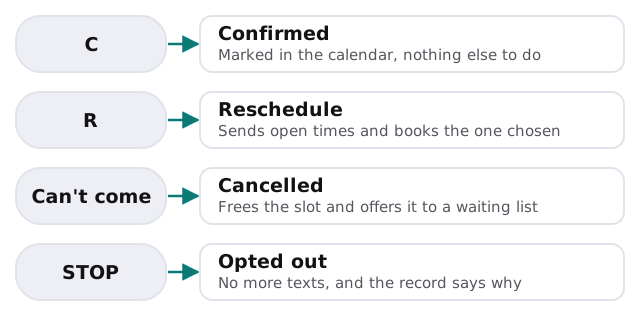
When a slot is freed, the setup can offer it to the next person on a waiting list. That’s the part that turns a cancellation from a loss into a rebooking.
What to decide up front
| Decision | Options | Why it matters |
|---|---|---|
| Channel | Text, email, or both | Some customers only read one |
| Timing | How many messages, how far ahead | Too many and people tune out |
| Language | Friendly, formal, bilingual | It should sound like your front desk |
| Cancellation window | How close to the time is too late | Sets what happens to a late cancel |
| Waiting list | Offer freed slots, or not | Decides if cancellations get refilled |
A note on permission
In the US, the FCC’s rules say that calls or texts to a mobile number sent using an automatic dialing system generally need the person’s prior express consent, and that advertising messages need prior express written consent. A person can revoke consent by any reasonable method, and replying “stop” counts. The rules say the request must be honoured within a reasonable time that is no more than ten business days.
In practice, three habits keep you on the safe side:
- Get consent at booking. A clear line next to the phone number field is enough to start.
- Keep reminders about the appointment. Leave promotions for a separate, properly consented message.
- Honour STOP right away. The setup should stop texts at once and record it.
These are general descriptions of a rule, not legal advice. Your adviser can tell you what applies to your state and your business.
What a person still handles
- A customer who replies angrily, or with a question about the service.
- Anything that suggests the booking itself was wrong.
- Late cancellations, if you charge for them. That’s your policy, applied by you.
Rather build it yourself?
If your booking tool already sends its own reminders, switch them on first, since it’s the cheapest fix. Our guide to setting up Zapier for your team shows how to connect two tools if you want a simple extra step. We build when you need replies that move bookings, a waiting list, or reminders that read from a calendar your booking tool doesn’t cover.
What we need from you
- The calendar or booking tool you use now.
- A sample of how you’d like each message to sound.
- Your cancellation rule, in plain words.
We begin with a plan and a fixed quote, and a person approves the wording and timing before any real customer gets a message.
A reminder that can’t be answered is just a nag. Let people reply, and let the reply do something.