Monday at 9:05, the whole front office is waiting for a spreadsheet to open, and everyone has the same theory about why. Slow office computers are a daily tax: seconds lost opening a file, a minute lost to a frozen screen, a morning lost when someone gives up and restarts. The good news is that the causes are few, and a methodical first look separates them quickly.
Start by splitting the problem
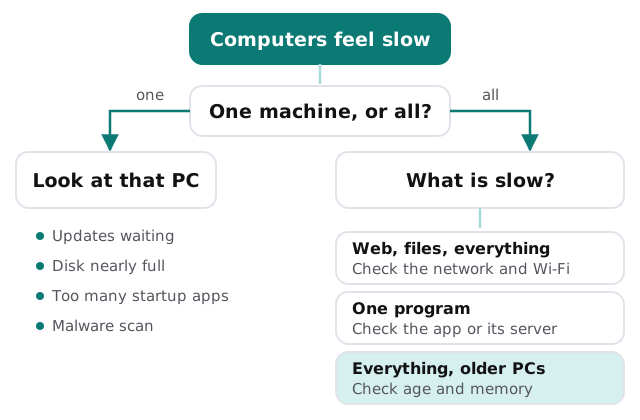
Before touching a setting, find out how widespread it is. One slow machine points at that machine. Everyone slow, at once, usually points at something shared.
The usual suspects
| What you see | Likely cause | Who fixes it |
|---|---|---|
| Slow only at start-up | Too many programs launching at boot | You, or IT |
| Slow after months of use | Full disk, old apps, pending updates | IT |
| Fan loud, browser sluggish | Too many tabs, or something unwanted running | You first, then IT |
| Only cloud files and web are slow | Network, Wi-Fi or the internet line | IT |
| One program is slow for everyone | The program or the server behind it | The vendor, with IT |
| Slow, and the machine is years old | Hardware that no longer fits the work | A planned replacement |
Fixes in the order Microsoft lists them
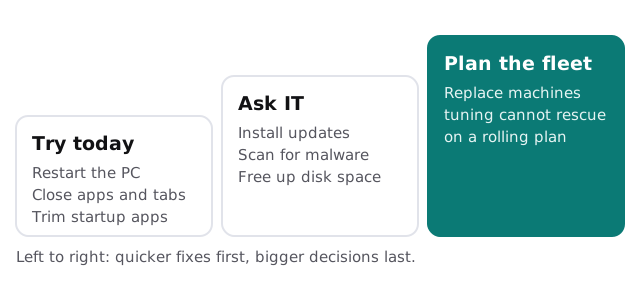
Microsoft’s guide for slow PCs is a good checklist because it moves from cheap to costly. In short:
- Install Windows updates and optional driver updates.
- Run a malware scan, because threats can use up resources.
- Free up disk space with Storage Sense or Disk Cleanup.
- Uninstall apps nobody uses.
- Turn off startup apps you don’t need.
- Turn off background permissions for apps that run when idle.
- Set visual effects to favor performance.
- Check Task Manager for heavy processes, and close unused apps and tabs.
Microsoft also lists a maximum-performance power mode. It uses more battery on laptops, which is a fair trade at a desk and a poor one at a client’s office.
When tuning stops paying off
Cleaning up a computer buys time, not youth. It’s time to plan replacement when:
- The fixes above helped for a week and then stopped helping.
- The machine runs Windows 10, which Microsoft stopped supporting on October 14, 2025.
- It takes longer to repair than it would to swap.
- It’s the third machine this quarter that someone has called “just slow”.
A steadier path is usually to replace a few machines a year on a schedule, with the oldest first, rather than all at once in an emergency. Our page on computer migration to new laptops covers moving people across without losing their setup, and Windows 10 end-of-support upgrades for business covers the support date in more depth. Tracking what you own makes the plan easier; see IT asset tracking for small business.
What monthly care changes
Much of what slows a PC down over time is a lack of routine: updates pile up, old software lingers, disks fill. With monthly care, updates, backups and access controls are handled as a habit, not as a response to a complaint. A written list of what each person uses also means the replacement conversation starts with facts.
How to report a slow computer usefully
A good report saves a visit. Ask your team to note:
- Which computer and who uses it
- What was slow: starting up, a specific program, web pages, or everything
- Whether it happens at certain times of day
- Whether anyone else nearby sees the same thing
Send it to us and a real person replies within one business hour, Monday to Friday, 9am to 5pm Pacific. The free IT check is also a fast way to get a plan and a fixed quote for anything that needs more than tuning.
Find out whether it’s one machine or the whole office before you fix anything. The answer decides everything else.