It’s Tuesday, 10:40, and the card reader says offline. Staff say the Wi-Fi “keeps going”. By Thursday somebody has restarted the router twice and the problem is back. If your office internet keeps dropping, the fastest fix is to stop guessing and work out where in the chain it fails.
Sort the cause in three questions
Most drops fall into three places: one device, the Wi-Fi, or the router and line. Two questions separate them.
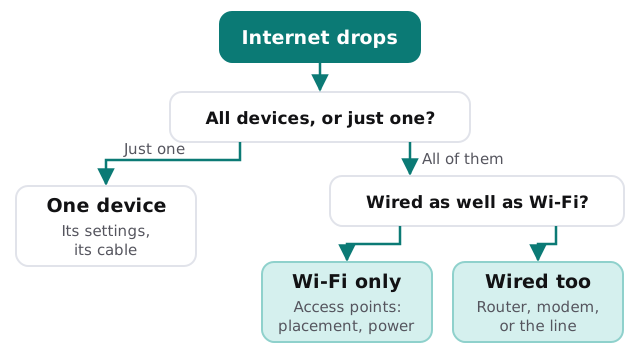
One device only
A single laptop dropping while others stay connected is rarely an office problem. Look at its Wi-Fi settings, its cable if it has one, and whether a recent update changed anything.
Wi-Fi only
If wired computers carry on and wireless devices don’t, look at the access points: where they sit, how many people share each, whether they’re powered properly, and whether their software is current. Wi-Fi is radio, and your neighbours’ networks share the same airspace.
Wired too
If everything drops together, the cause sits upstream: the router or firewall, the modem, or the provider’s line. This is where a log pays off.
What usually turns out to be wrong
| Symptom | Common cause | Fix tends to be |
|---|---|---|
| One back room is always bad | Too far from the nearest access point | Move or add an access point |
| Drops at busy times | Too many devices on one weak point | Better placement or more points |
| Everything restarts together | A tired router or a power problem | Check power first, then replace |
| One cable run is flaky | A damaged cable or loose connector | Re-terminate or replace the run |
| Fine for days, then fails | The line, or something scheduled | Take the log to the provider |
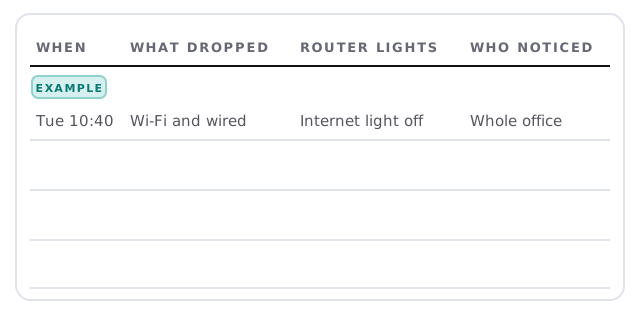
Keep a log for a week
Don’t trust memory. A sheet by the router that anyone can write on gives you evidence, and evidence is what a provider needs before they’ll look at the line.
Try these, in order
- Check the power. Make sure the router, modem and switches are on proper outlets, not a loose strip shared with a heater.
- Reseat the cables. A half-seated connector causes the kind of fault that looks like magic.
- Test one wired computer. Keep it connected during a drop and see if it survives.
- Read the log. Is it the same time, the same room, the same people?
- Update the equipment. Router and access point software that’s long out of date causes oddities.
- Call the provider with evidence. Dates, times and lights, not just “it’s slow”.
Changes that muddy the evidence
When the internet is unreliable, everyone wants to help. Someone swaps a cable, someone else resets the router to factory settings, and a third person buys a “booster” from the office-supply store. Each change might fix something, but together they make it impossible to say what did. Change one thing at a time, note the date in the log, and give it a few working days before judging the result. If a fix works, you’ll want to know which one.
When it’s a project, not a fix
Repeated drops in the same place usually mean the network was never planned for how the office is used now. That’s a job for a survey and a layout, not another reboot. Our pages on office network setup and business Wi-Fi security cover what a properly planned network looks like, and network monitoring catches the next drop before anyone has to report it.
What we need from you
- Your log, even if it’s a few scribbled lines.
- The make and model of the router, and how many access points you have, if you know.
- A rough floor plan showing where the drops are worst.
We start with the free IT check, then give you a plan and a fixed quote. A real person replies within one business hour, Monday to Friday, 9am to 5pm Pacific.
A drop with a timestamp is a clue. A drop remembered as “sometime last week” is just a complaint.