It happens at the worst times. You go to add a user, or fix mail flow, and the admin account will not let you in. The code goes to a phone you replaced. The password is wrong. Or the person who created the account left a year ago. If you are typing “locked out of Microsoft 365 admin account” into a search box, it is already a stressful morning, because it feels like losing the keys to the business.
Take a breath. Most lockouts are one of a few types, and each has a known route out.
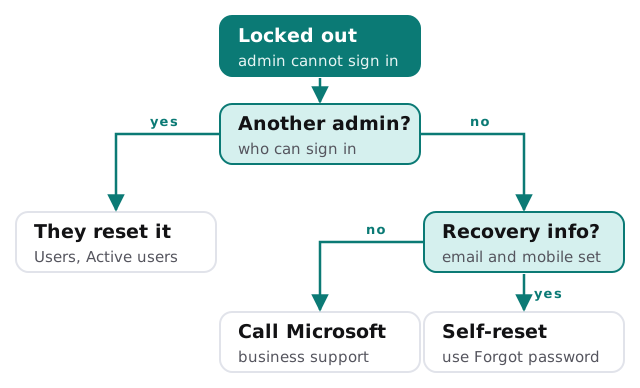
Start with one question
The right next step depends on who else has access and what recovery details are on the account.
What each path involves
Another admin exists
An administrator with the right role resets the password from the admin centre. Microsoft’s guide tells them to go to Users, then Active users, select the person and choose Reset password. They need to be a password administrator or hold a higher role. This is the quickest fix, which is why it pays to have more than one admin.
You can still reach the recovery details
If you can reach the alternate email and mobile number set on the account, sign in, choose Forgot password and follow the wizard. Microsoft says it uses those details to verify that you are the right person to reset the password.
You are the only admin and the details are gone
Microsoft’s guide says to ask your administrator, check you have alternate contact information, or call Microsoft Support. If you are the administrator, the call is the route. Support has to be sure who it is talking to, so find the domain registration details and any records of the Microsoft 365 purchase first.
Reading the symptom
| What you see | Likely cause | Next step |
|---|---|---|
| Password rejected | Changed, or typed wrong | Forgot password, if recovery info is current |
| Code never arrives | Old mobile number | Another admin can update your sign-in details |
| Authenticator on a lost phone | Device replaced | Another admin, or support |
| Account says it is disabled | Someone turned it off | Another admin, or support |
| You were never an admin | Account not in a role | Ask the person who created the tenant |
Things not to do
- Do not keep guessing. More wrong attempts do not help and can make things worse.
- Do not create a new tenant as a shortcut. You will end up with two organisations and no mail history in the new one.
- Do not pay a stranger who offers a quick recovery. Real recovery goes through Microsoft.
- Do not share the screen with someone who contacted you first, claiming to be support.
Once you are back in
Fix the cause, not just the symptom.
- Add a second admin who is a different person, with their own sign-in.
- Update the recovery details on every admin account.
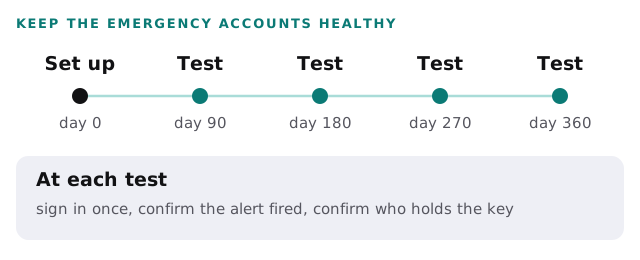
- Create emergency access accounts. Microsoft recommends two or more, kept cloud-only on the onmicrosoft.com domain, with a security key or other phishing-resistant method that differs from your daily admins. They should not be tied to one employee or phone.
- Test them regularly. Microsoft says to validate them at least every 90 days and when IT staff change.
Where we come in
We cannot override Microsoft’s checks, and nobody else can either. What we can do is help you gather the evidence, work through the steps and then put the safety net in place. A plan and a fixed quote come first, and the free IT check will list who holds which role today.
If the lockout is a symptom of a bigger gap, such as a departed IT person, read what to do when your IT person quits. The sequence for a clean start is in Microsoft 365 setup for small business, and the people-side routine is in employee onboarding and offboarding IT.
An admin account that only one person can open is not a security measure. It is a single point of failure with a password.
What we need from you
- The domain name, and who registered it.
- Any record of the Microsoft 365 purchase.
- The exact wording of the error on the sign-in screen.