Managed IT services for solar companies come down to a tidy trail of paperwork behind every install. A rooftop project passes through sales, design, permitting, installation, inspection and the utility, and each stage produces files that the next one needs. Where those files live is an IT question.
The job is the unit
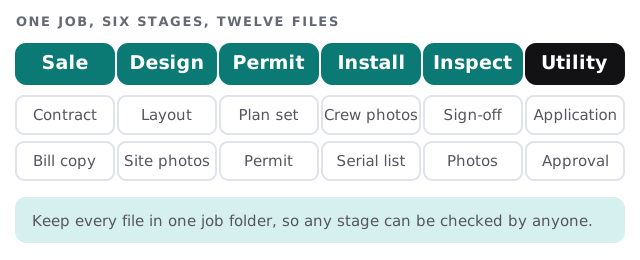
A typical sale starts in a CRM, a design tool holds the layout and a job-management tool schedules the crew. Each is a separate product from a separate company, and the glue between them is usually a person copying names. We don’t rebuild those tools. We help you choose a single system as the record and keep the others in step.
Photos from the roof, step by step
Site photos carry more weight than their size suggests. They support the design, the permit and the inspection. Treat them as records, not camera-roll pictures.
- Name the job first, in the app, before the crew takes a picture.
- Upload from the roof on mobile data if the signal allows, and from the truck otherwise.
- Check the set against a short list: roof, panel, meter, attic or electrical panel.
- Keep the originals in the job folder, with the resized copies used for the permit alongside.
- Clear the phone once the upload is confirmed.
Logins to places you don’t control
A solar job involves websites run by other people: a city or county permit office, the electric utility, the lender, the equipment maker and the monitoring service. Every one has an account, and each account is registered to someone’s email.
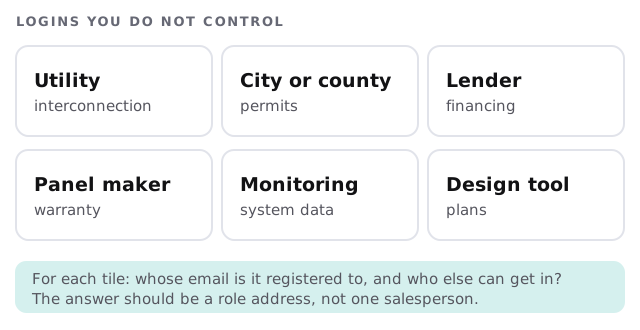
| Portal | Why it matters | Safer way to hold it |
|---|---|---|
| Permit office | Applications and status checks | A shared role address, named users |
| Utility | Interconnection requests | Same, with a backup contact |
| Lender | Funding milestones | Limited to finance and the owner |
| Monitoring | Customer system data | Access ends when the job hands over |
Crews on the road
Installers carry phones and tablets, sometimes shared across a crew. A few habits prevent most losses:
- A lock on every device, and a way to wipe a lost one.
- A named login per person, not a “crew 3” account.
- A charger and a spare tablet in the truck.
- Photo apps set to save to the job, not to a personal album.
A project stuck on one document
Here’s a scene most solar offices know. An inspection is passed, but the utility asks for the serial list. The installer has it on a phone. The phone belongs to a crew lead who is on another roof. Everyone waits. With one job folder and one place for serial numbers, the office finds it in a minute.
After the install
A finished system leaves a trail that lasts for years: the monitoring account, warranty paperwork and any questions from the customer. Decide who answers them, where the records are kept and how a customer’s monitoring login is handed over when the job closes. If the answer is “whoever installed it”, you have a list of people to keep track of as they come and go.
Bad-weather days
Rain moves crews between jobs at short notice. A schedule that changes by text message needs a single source the whole crew can open from the truck, with the new address and the job folder attached. Otherwise someone arrives with the wrong plans.
When people leave
Sales reps and designers know a lot. The CRM, the design tool and the portals should each be closed or reassigned on the day someone goes, and their open projects handed to a named colleague. Keep that list written down and short.
What we need from you
- The tools you use for the CRM, design, scheduling and finance.
- A list of the outside portals and the email each is registered to.
- How crews send photos today.
- Who approves access for new hires.
Monthly care covers access controls, backups and updates. The free IT check ends in a plan and a fixed quote.
A solar install lives or dies on paperwork. Put it where the next person can find it.