Managed IT services for senior living communities have a constraint most offices don’t: there is no off-hours. Care continues through the night with the fewest people on duty, so the systems that staff rely on have to work without someone calling an IT person at midnight to explain them.
One building, three shifts
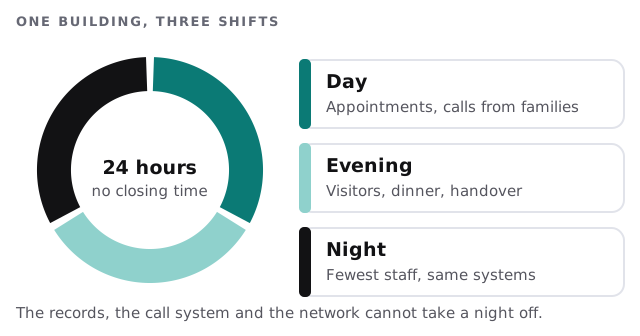
That shapes the work. We do changes during the day, when more people are on site, and we write down how each system behaves so a night-shift caregiver can see what’s wrong and what to do next. We can’t promise that nothing will fail. We can make the failures predictable and the fixes known.
Three groups on three networks
Treat these as three separate audiences:
- Residents and visitors. Phones, tablets, televisions and video calls with family. Internet access only.
- Care and office staff. Records, handhelds, scheduling, email. Protected, logged in and individually named.
- The building. Door controls, call alerts, cameras, thermostats. Often installed and supported by outside vendors, so they need a plain list of who maintains what.
If these share one network, a visitor’s laptop can reach the care records. Separating them is a cheap change with a large effect.
What relies on what
Care records on handhelds
Most communities use software for care plans, medication records and daily notes, often on a tablet carried on the floor. The common problems are mundane:
- Devices drained before the shift ends.
- A shared login on the hall tablet, so entries don’t show who made them.
- Dead spots in a stairwell or at the end of a wing.
- Slow sign-in, which tempts staff to leave a screen unlocked.
Fixing them is a mix of device management, Wi-Fi coverage and one login per person, using a quick sign-in method suited to a busy floor.
The handover at shift change
Here’s what a good handover looks like. The outgoing caregiver finishes their notes on the tablet. The incoming caregiver logs in under their own name and sees the same record. Nothing is on paper unless it has to be. When it works, nobody mentions it, and the handover takes minutes.
A word on health privacy rules
Whether the federal health-privacy rules apply to you depends on whether you are a covered entity, which the regulation defines as health plans, clearinghouses and health care providers who transmit health information electronically in connection with certain transactions. Some communities are, and some aren’t. Don’t guess. Ask counsel. We explain what a rule asks for and help with practical measures such as access control and backups. We don’t say that a community or a product is compliant.
Power, phones and the things in the ceiling
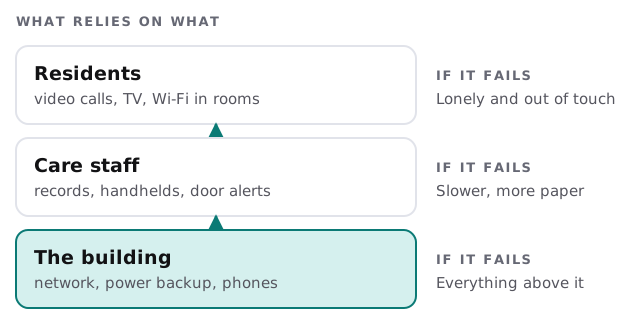
Some of the most important equipment is out of sight: switches in a closet, a battery backup that nobody has tested and a phone system that rings through to a front desk. Label each one, write down where it is and who maintains it, and test the battery backup on a schedule. When a storm or a repair knocks something out, the first question is always where it is and who to ask.
Residents’ own devices
Many residents are glad to have a tablet and a video call with grandchildren. Some need help setting it up. Decide who helps, whether the community is responsible for those devices and what the guest network can and can’t do. A written one-pager saves a lot of ad hoc advice.
What we need from you
- Your care-records software and the vendors for locks and alerts.
- A map of the building’s network, even a sketch.
- Your staffing pattern, so changes avoid the busiest hours.
- Who is allowed to approve access for new and agency staff.
Monthly care covers access controls, backups and updates. The free IT check ends in a plan and a fixed quote.
A community that never closes needs systems that don’t have a bad hour. Plan for the quiet one.