Managed IT services for staffing agencies need to handle a particular tension. You collect identity documents, bank details and work history from many people quickly, and you must find them years later. Some of those people were placed for a week. All of it is sensitive, and it sits in tools set up by recruiters in a hurry.
What you hold about people who aren’t permanent staff
- Candidate records: résumés, interview notes and contact details, usually in an applicant-tracking system.
- Onboarding documents: identity and work-eligibility papers, tax forms and bank details for pay.
- Time and attendance: hours submitted weekly by workers and approved by clients.
- Client data: job orders, contract rates and the contacts at each client.
Each group should have one home, one list of who can open it and one rule for how long it stays. Most agencies have a good ATS and a messier trail around it: scans on a shared drive, résumés in email and a spreadsheet kept by one coordinator.
The cutoff
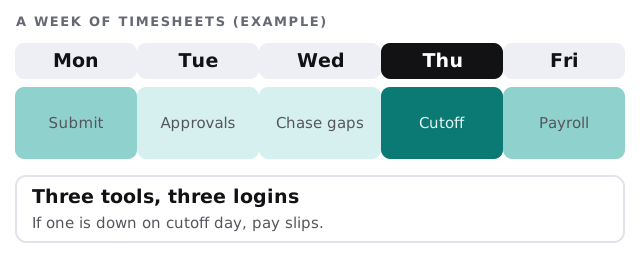
On cutoff day, timesheets, client approvals and payroll all have to work. Our part is the dull groundwork: logins that work, access for approvers who rarely sign in and a fallback for a bad day.
Form I-9: how long it stays
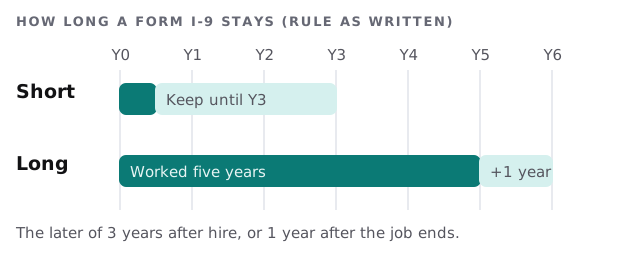
The US employment-eligibility form is a good example of a retention rule. The regulation says an employer keeps the form for three years after the date of hire, or one year after employment ends, whichever is later. A one-week placement and a five-year one therefore end at different times.
Whether this applies to you, and how, depends on whether you are the employer, so check with counsel or your payroll provider. For IT, the lesson is practical. These forms need a protected home, not an inbox. They should be searchable by worker and date, and handled according to the retention rule your counsel gives you.
When a recruiter leaves
- Close the logins the same day, for the ATS, email, phone system and any job boards.
- Reassign their candidates and clients to a named person.
- Forward their mailbox to a manager for a set period.
- Check shared drives for files saved to a personal folder.
- Collect the laptop and the phone, and wipe them.
Questions to ask any provider
- Who can export the whole candidate list, and can that be limited?
- Where are onboarding scans stored, and who can open them?
- What is the fallback if the timesheet tool is unavailable?
- How quickly can a departing recruiter’s access be closed?
Client sites and temporary access
Some placements need your worker to use a client’s systems, and some clients ask your agency to supply a laptop. Agree early who owns the device, who sets it up and who takes it back at the end of the assignment. A worker who finishes on Friday shouldn’t still hold a login or a laptop on Monday. Keep a simple list of what each active assignment has been given, and tick it off when the assignment ends.
Remote and branch offices
Recruiters often work from home or from small branch offices, using a softphone, a laptop and an ATS. Each should have a locked device, a named login and multi-factor sign-in on email and the ATS. That is where candidate data is most likely to be mishandled.
What we need from you
- Your ATS, timesheet and payroll tools, and who administers them.
- Where onboarding scans live today.
- A list of recruiters and offices.
- Your cutoff calendar, so we never change anything near it.
Monthly care covers access controls, backups and updates. The free IT check ends in a plan and a fixed quote.
Candidates trust you with their papers on day one. Keep them somewhere better than an inbox.