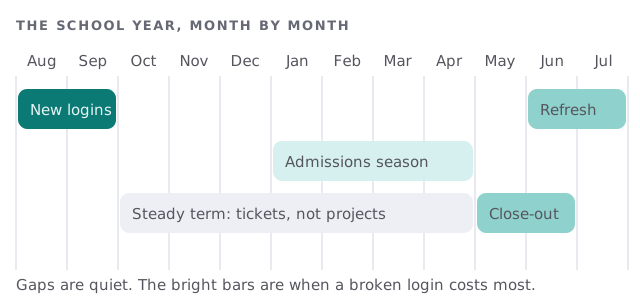
Managed IT services for private schools should follow the school year, not the other way round. Your busiest weeks are predictable: new students arrive in August, applications build in winter and everything ends in June. Most school IT trouble comes from doing the same work at the last minute every year.
The teacher who fixes the Wi-Fi
Many small schools run on goodwill. A science teacher knows the router, a parent set up the printers and the business manager holds the only admin password. It works until that person goes on leave or leaves the school.
Signs it has stopped working:
- Logins are made one at a time, in the first week of term, while classes wait.
- Nobody knows which tablets belong to which grade.
- Updates wait for someone to remember.
- A former employee’s account still opens the gradebook.
Devices, and who they belong to
Different groups use different devices, and each fails in its own way.
| Group | Typical device | What goes wrong |
|---|---|---|
| Lower grades | Shared tablets on a cart | Cart not charged, apps out of date |
| Upper grades | Laptops or Chromebooks, sometimes taken home | Cracked screens, forgotten passwords |
| Teachers | Laptop plus a classroom display | Display won’t connect before first period |
| Office | Desktops, a printer and a phone line | One shared login for three people |
A simple tracking list, with a device, a person and a date, prevents most of the arguments in June.
Records: what a rule does and doesn’t reach
The federal student-records law, FERPA, is the rule most people name. Its own regulation says it applies to an institution that receives funds under a program run by the US Department of Education. That covers some private schools and not others, so check with your business office or counsel rather than assuming. We explain what the rule says. We don’t tell you whether you are covered, and we don’t claim compliance for anyone.
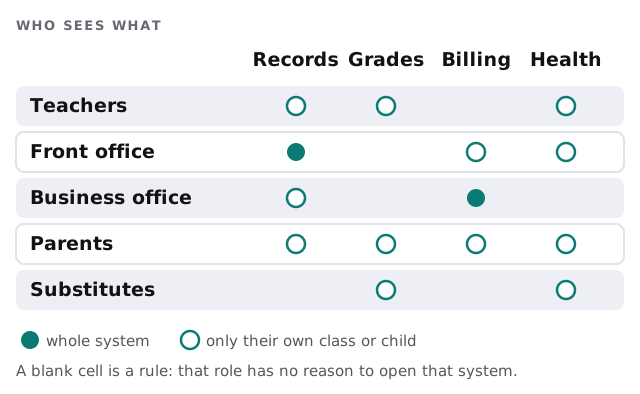
Whatever the answer, the practice is the same. Give each adult only what the job needs.
The two weeks before the first bell
- Get the final roster from the office, with grade and homeroom.
- Build accounts from it, in one batch, not by hand.
- Test the display and the Wi-Fi in every classroom, with a laptop that isn’t the teacher’s.
- Charge and update the carts, then label them.
- Check the parent portal with a real parent account, not just an administrator’s.
Admissions and re-enrollment
Between January and spring, families fill in forms, upload documents and pay deposits. Treat that as a busy season for IT too. Check that the forms reach the right inbox, that uploaded files land in a protected folder and that the person who answers questions has a backup.
Guests, events and the open campus
A school hosts people all year: visiting parents, tutors, coaches, a board that meets in the library. Give them guest Wi-Fi that can’t see the office network or the printers. Keep the camera and door systems, if you have them, on their own network as well. Then a fundraiser night or an open house doesn’t put the gradebook on the same wire as a stranger’s phone.
Ask, too, who may plug something in. A donated projector or a parent’s spare laptop is generous, but it should be checked before it joins the network.
What happens in June
Graduates and leavers keep their accounts unless someone closes them. Decide what happens to a departing student’s files, collect borrowed devices, reset and store them, and remove staff who aren’t returning. Doing it once, in a list, is easier than finding the strays in October.
What we need from you
- Your student information system, learning platform and billing tools, and who administers each.
- A count of devices, by group.
- The calendar, with the dates that cannot slip.
- Who is allowed to approve changes.
Monthly care covers access controls, backups and updates. The free IT check ends in a plan and a fixed quote.
A school year only starts once, so build the accounts before the children arrive.