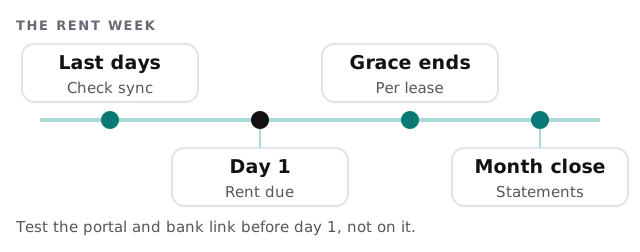
Managed IT services for property management companies come down to one calendar date. On the 1st, rent is due, tenants log in to pay and your software has to post money to the right account. Everything else, from work orders to lockbox codes, is the same rule applied across many buildings.
Here’s what the 1st looks like once it’s set up
The portal is up. The bank link was checked on the 28th. A tenant pays at 7am, the payment shows on the ledger by the time the office opens and the coordinator spends the morning on a leaking tap, not on a payment that vanished. Nothing dramatic happened, which is the aim.
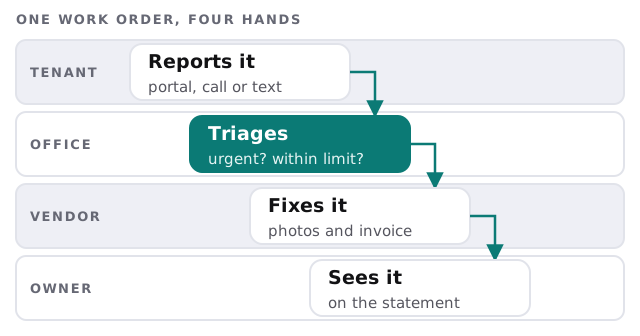
A work order passes through four hands
A broken heater is reported by a tenant, triaged by an office coordinator, fixed by a vendor and eventually shown to the owner. Each hand uses a different tool. If any link is a personal phone or a text thread, history goes missing.
What the property software holds
A property management system, of which several well-known products exist, is usually the ledger, the tenant portal and the work-order log in one. We don’t replace it. We make sure the people using it have their own logins, the right level of access and a backup of what matters.
Access that isn’t a key
Smart locks, keypad codes and lockboxes are IT as well as hardware. Keep a list of who holds which code, change codes when a tenant, vendor or employee leaves, and know which vendor’s portal controls the locks.
Vendors and the money they are owed
Vendor invoices are where fraud usually arrives, often as an email asking to update bank details. Our plain rule: no change to payment details by email alone.
What owners see
Owners judge you by the statement and the portal they log in to. If a repair appears with no invoice, or a deposit appears a week late, they ask why. Clean records are the cheapest form of customer service you have. Decide who can edit a closed month, and make sure any change leaves a trace.
Signs you need more than a part-time fixer
- Two managers keep two versions of the vendor list.
- Tenants report that the portal won’t let them in, and nobody can say why.
- A coordinator’s old account still receives owner messages.
- Month-end takes days because the bank and the ledger don’t agree.
- A laptop is stolen and nobody knows what was on it.
Questions to ask any provider
- Which of our tools do you administer, and which do you only advise on?
- Who can see owner and tenant data, and can you show me the list?
- What happens to a departing coordinator’s access?
- How do we test the rent-day path before the 1st?
- Who do I call when the portal vendor’s system is down?
Remote managers, many sites
Property teams are often out of the office, moving between buildings with a phone and a laptop. Each device should lock itself, update itself and be wipeable if lost. Use multi-factor sign-in on the property software and email, since those two hold most of what an attacker wants.
When a building changes hands, treat it as a small migration: who exports the tenant ledger, which logins are created for the new owner’s team and which are closed for the old. Doing this from a checklist beats doing it from memory in the last week of the month.
What we need from you
- The property software, the portal, the banks and the lock systems you use.
- A list of everyone with access, staff and vendors alike.
- How rent reaches the ledger today, and who reconciles it.
Monthly care covers access controls, backups and updates. The free IT check ends in a plan and a fixed quote.
The software won’t know the vendor’s bank details changed. Someone with a phone number must.