Managed IT services for medical practices have to start from how a visit really flows. A patient books, checks in, sees a clinician, leaves with orders, and then the claim moves on. Each of those steps lives in a different system, and each system is run by a different vendor.
Follow one visit through your systems
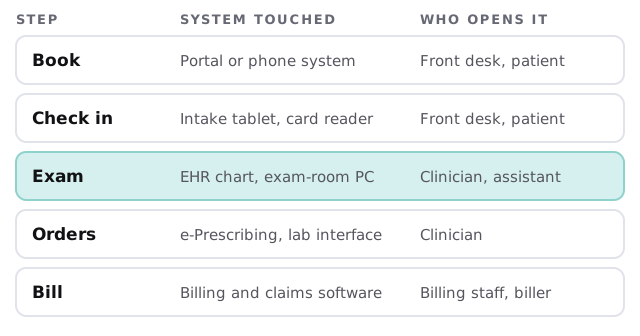
Where the pressure lands
- Exam rooms. A clinician with a patient in front of them can’t wait two minutes for the chart. Each room needs a computer that wakes quickly and signs in without a shared password.
- The front desk. Check-in tablets, card readers and the phone system all hang off the same network as the EHR.
- Orders and results. E-prescribing and lab connections only work while the right accounts and certificates stay current.
- Billing. Claims go out through a clearinghouse or an outside biller, so that connection needs watching too.
Shared exam-room computers
Exam-room PCs are used by several people in one morning. Two settings do most of the work. Each person signs in under their own name, because the Security Rule lists unique user identification as required. And a session ends on its own after a period of inactivity, which the rule lists as automatic logoff, an addressable item you implement or document why an alternative fits. Badge-tap sign-in makes both fast enough that staff stop working around them.
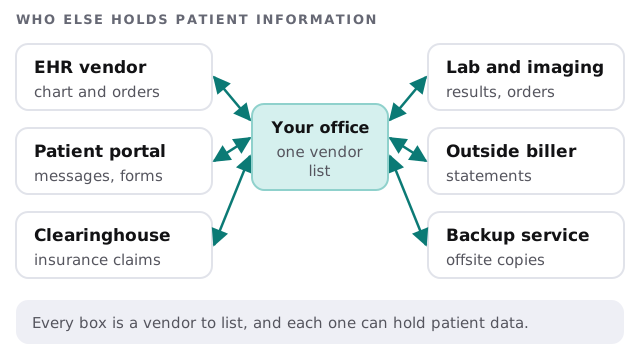
The vendor list nobody keeps
Most practices can name their EHR. Few can name everyone else with a window into patient data. We build that list with you: what each vendor holds, who at your office manages the relationship, and what happens to the account when that person leaves.
What the HIPAA rules ask for
HIPAA applies to a health care provider who transmits health information electronically in connection with covered transactions, which is how most practices bill. We can explain what the rules ask for. We don’t certify a practice and the program stays yours.
| The rule | What it means in plain words | Where IT helps |
|---|---|---|
| Risk analysis (164.308) | A thorough look at risks to electronic patient information | A current list of devices, accounts and data locations |
| Contingency plan (164.308) | A backup plan, a disaster recovery plan and an emergency mode plan | Backups that are restored on a schedule, and a written order of recovery |
| Breach notification (164.404, 164.408) | Notice to patients within 60 days of discovery; 500 or more people also means notice to HHS at the same time | Logs and records that show what was reached |
What a quiet Thursday looks like
At 7:45 the clinic opens and every exam-room PC is already on the current build, because patches installed Tuesday night. A new medical assistant started that morning and has an EHR login set to her role, nothing more. The lab interface was checked after the last certificate renewal. At lunch somebody notices the check-in tablet is slow, calls, and gets a reply from a real person within 1 business hour.
None of it is dramatic, and nobody on staff had to become the IT person.
Questions to ask any managed IT provider
- Who at your company can see our patient systems, and is their access recorded?
- How do you handle a dead exam-room PC while the clinic is running?
- Which EHR and billing tools have you supported?
- How do you tell us about changes before they happen?
- What happens to our accounts and data if we stop working together?
Ask us the same five and compare the answers.
A medical practice’s IT is only as strong as the vendor you forgot to list. Start there.