AI automation for dental offices has a head start over most industries, because the business already runs on lists: patients due for a cleaning, treatment that was presented, claims waiting on a payer. The trouble is that someone has to build those lists by hand between phone calls.
We build small AI tools and internal tools that sit beside your practice management software. The dentist decides everything clinical, and your front office approves every message to a patient.
Four problems, and a first move for each
| Problem | What it looks like | First move |
|---|---|---|
| Recall backlog | Patients overdue and nobody calling | A daily list of who is due and unbooked |
| Unscheduled treatment | A plan presented in March, no appointment | A follow-up queue with a drafted message |
| Insurance surprises | A patient learns their coverage at checkout | A checklist of what’s unconfirmed before the visit |
| Open chair time | A cancellation nobody can fill | A shortlist of patients who asked for earlier slots |
The recall loop, with a person at each gate
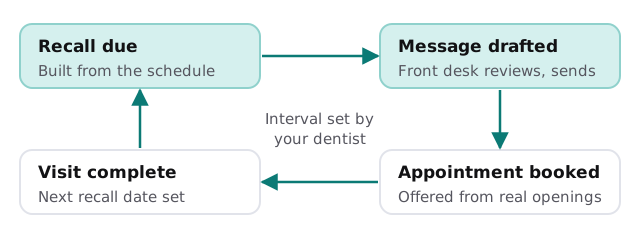
Hygiene recall is the steady income of a general practice, and it’s also the first thing to slip when the schedule is tight. A tool compares the schedule with each patient’s last visit and the interval your dentist set, then drafts a short, friendly reminder. It offers real openings from the schedule and never promises one it can’t see.
Treatment that was presented and then went quiet
The treatment coordinator knows which plans are waiting, but the list lives in their head or in a report nobody runs. The tool surfaces it: who was presented what, when, and whether anything has been booked since. For each one it drafts a gentle note that points back to the plan in the patient’s own record. The coordinator decides who deserves a call instead of a text, and the dentist decides what to say if the patient has questions.
The morning huddle, prepared
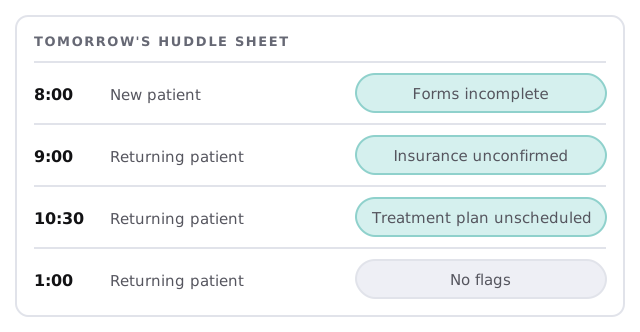
Most offices hold a short huddle. The sheet makes it faster, because the flags are already there. Forms are incomplete, a payer hasn’t been checked, a plan is open. Each flag has an owner and a next step.
A note on patient information
HIPAA’s rule text defines a covered entity to include a health care provider who transmits health information electronically, and a business associate as a person who creates, receives, maintains or transmits protected health information on a covered entity’s behalf. If a vendor or tool handles patient records for your office, the rule has specific consequences, and your compliance adviser is the right person to say what they are. We make no compliance claims about any product. Our approach is to give each tool the least information that lets it do its job, and often a task such as recall needs no clinical data at all.
The software around the chair
- Practice management. Schedule, patient records, ledger and claims.
- Patient communication. Reminder and recall messaging.
- Eligibility and claims. Verifying coverage and submitting to payers.
- Imaging. Sensors and image storage, which we leave alone.
- Phones and forms. Where intake and first contact happen.
We don’t claim any named product is integrated. If you’d like to try a simple version first, setting up Zapier for your team covers moving a form into a spreadsheet and a message.
Questions for any provider
- What will the tool read, and can it write to anything?
- Could this task be done from the schedule alone?
- Who approves each message?
- How do I remove its access, and what does the log show?
Beginning
Tell us which practice management software you use, how recall works today and which list you’d most like to have by 8am. We’ll return a plan and a fixed quote after the free IT check. A real person replies within 1 business hour, Monday to Friday, 9am to 5pm Pacific.
The schedule already knows who’s overdue. Someone just needs to be handed the list.