A medical practice does not have one IT system. It has a chain of them, and a patient moves through the whole chain in forty minutes. IT consulting for medical practices is the work of walking that chain, finding the weak link, and agreeing what to do about it.
Most practices have never drawn the chain. Each tool was bought for its own reason, by a different person, in a different year.
One visit, six stops
Follow a single appointment from the waiting room to the bank. At each stop there is a screen, a login and some patient information.
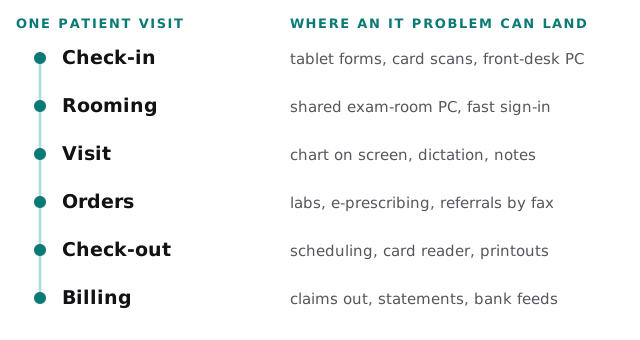
A consult asks the same three questions at every stop. Who can see this? What happens if it stops working? Where is the copy?
The rule, in four lines
The HIPAA Security Rule applies to covered entities. Four pieces of it shape most IT consults. We summarise them here and cite the text; they are not legal advice.
| What the text says | What it means at the desk |
|---|---|
| Conduct an accurate and thorough assessment of risks to the confidentiality, integrity and availability of electronic protected health information | A written look at every system in the chain above |
| Implement security measures sufficient to reduce risks to a reasonable and appropriate level | A list of fixes, ranked, with a name next to each |
| Establish a data backup plan, a disaster recovery plan and an emergency mode operation plan | Copies you can retrieve, a way to restore, a way to keep seeing patients |
| Maintain policies in written form, retain the documentation for 6 years, and update it when conditions change | A folder someone owns, with dates on it |
The same section also asks for periodic evaluation in response to environmental or operational changes. A new hire, a new scanner and a new software vendor are all changes.
Three places practices get stuck
The shared exam-room computer
Providers move between rooms and need to be in a chart in seconds. The temptation is a shared login that never logs out. A consult looks for the middle path: individual sign-in that is quick, and screens that lock when someone walks away.
Referrals and faxes
Fax is still how many practices send and receive referrals. It is also the place where paper copies of records pile up. We map which referrals arrive by what route and where each one is stored afterwards.
Vendors with your data
The record system, the billing service, the patient portal and the texting tool each hold patient information. Do you know who at each vendor can see it, and what happens to it when you leave? Our page on IT consulting for dental offices covers a similar vendor question for a different kind of clinic.
The downtime drill
The contingency plan only counts if staff have rehearsed it. The loop below is short on purpose.
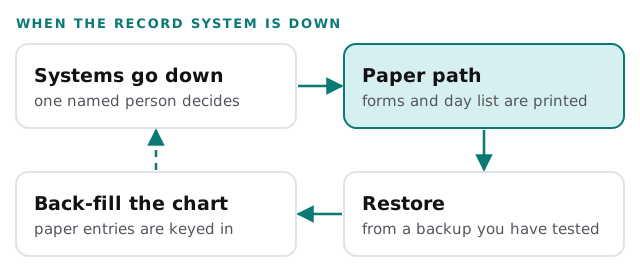
Try it once on a quiet afternoon. The things that fail are rarely technical. A printer is out of toner, or nobody knows the code to the cabinet where the forms live.
Signs you need an outside view
- Nobody can name every system that holds patient information.
- The person who set up your network no longer works for you.
- A backup exists, but no one has restored from it.
- Staff use personal phones for appointment texts.
- Your last written assessment is older than your last major system change.
If the third sign is familiar, our page on managed IT services for medical practices explains how monthly care keeps backups and updates in order after the consult ends.
A practice does not fail an assessment because it has risks. It fails by not knowing what they are.
What we need from you
- A walk-through at a normal working hour, not a quiet one.
- A list of vendors, even if it is incomplete.
- Whoever handles compliance questions in the practice, in the room for the first conversation.