Managed IT services for cleaning companies have to start from an odd fact: your most sensitive systems aren’t in your office. They’re in other people’s buildings, behind alarm codes your crews carry in their heads and on their phones.
Your real asset is access
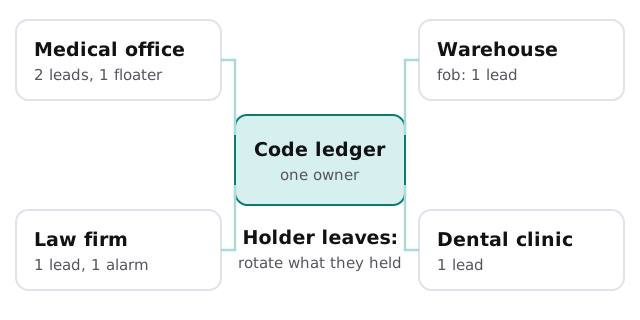
A cleaning company holds the way into a lot of places at the hours when nobody is watching: medical offices, law firms, a dental clinic, a warehouse. Each client trusted you with that, and most of it comes down to a short list of codes, fobs and keys.
What the day looks like
Your office works nine to five. Your crews don’t. That gap decides how you set up IT.
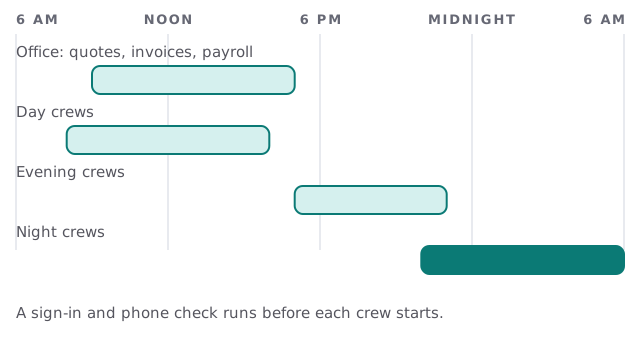
Our replies come from a real person within one business hour, Monday to Friday, 9am to 5pm Pacific. Because of that, we build around it. We set up so that a night crew has what it needs before it leaves the yard, and so that anything that breaks has a written fallback until the office opens.
The systems a cleaning company runs
- Scheduling and routing. Which crew, which building, which nights. This is often a spreadsheet that has quietly become critical.
- Time and attendance. Clock-in on phones, sometimes with location, feeding payroll.
- Quotes and contracts. Square footage, frequency, special requests, signed agreements.
- Invoicing and payroll. Many small clients, many hourly staff, and the same cycle every two weeks.
- Supplies and equipment. Orders, who has which machine, what was used where.
- Communication. The group chat, the client emails, the text to the supervisor at 10pm.
When a cleaner leaves
Turnover is normal in this work, so the exit has to be routine and quick. Here is what we put in place.
- Remove the login. One account per person means one switch, not a hunt through shared passwords.
- Take back the physical items. Keys, fobs and any company phone.
- Rotate the codes. Use the ledger to find every building that person held, and change those codes that week.
- Tell the supervisor. They need the new code and to know who lost access.
- Wipe the phone’s work data. If it was a personal phone, remove only the company app and its data.
Phones are the whole crew toolkit
For most crews, a phone is the time clock, the schedule, the camera for “before” photos and the way to reach a supervisor. That makes phone rules the most useful IT decision you’ll make.
| Question | A workable answer |
|---|---|
| Whose phone is it? | Company phone for supervisors, a work-only app profile for everyone else |
| What can it open? | The scheduling and time app, nothing from the office server |
| What if it’s lost? | One person can lock it and sign the account out the same morning |
| Who sees photos? | Photos upload to the job record, not a personal camera roll |
Signs you need this
- You can’t say how many people know a given building’s code.
- Your last departure involved a phone call asking “did you get the keys back?”
- One laptop holds your contracts, rates and client contacts.
- Payroll is late whenever someone forgets to clock out.
A client asks, “How do you protect our building?”
Larger clients, such as medical and legal offices, increasingly ask vendors about how they handle keys, accounts and data. Your answer shouldn’t be improvised. We can document what really happens, such as who holds which codes, how departures are handled, how the office laptop is backed up, and what is on crew phones. Then you answer from facts instead of hope.
What we need from you
- The list. Every client site, and who holds access to it.
- Your apps. Scheduling, time, payroll, invoicing, and where each one’s data lives.
- Your phones. Company-owned or personal, and who uses them for what.
- Your last departure. How it went, so we can see where it leaked.
Monthly care covers the access controls, backups and updates that keep this tidy. The free IT check ends in a plan and a fixed quote.
A cleaning company sells trust at night. The ledger and the exit routine are how you keep that promise when someone moves on.