Managed IT services for commercial real estate firms are easiest to explain deal by deal. A brokerage doesn’t run on a single product. It runs on a long chain of people outside your firm, each of whom needs to see some documents at some moments and none of them at others.
One deal, five stages, five different guests
Think about who needs what as a sale moves forward.
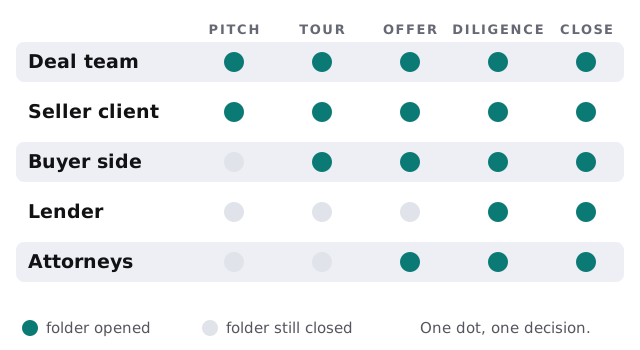
A buyer’s broker should see the offering package, not your client’s internal notes. A lender needs the rent roll and leases during diligence and nothing before. When all of it sits in one shared folder with a link, you can’t tell who saw what, and you can’t close access without breaking everything else.
The software a brokerage leans on
| Category | Used for | What goes wrong |
|---|---|---|
| Listing and market-data subscription | Comps, ownership, tenant data | Seat bought on a personal email |
| CRM or deal tracker | Owners, tenants, pipeline stages | Half the firm keeps its own spreadsheet |
| Document and deal-room storage | Offering memoranda, leases, rent rolls | A link sent once stays live forever |
| E-signature | Letters of intent, agreements | Signed copies filed in someone’s inbox |
| Property management and accounting | Rents, operating costs, tenant requests | Reports exported by hand each month |
| Phones and email | Everything else | Contacts only in the broker’s phone |
Where the book of business lives
The thing a brokerage can lose is its relationships, and they’re stored in people’s pockets. When contacts, lease expirations and showing notes are on a personal phone, the firm owns none of it in practice.
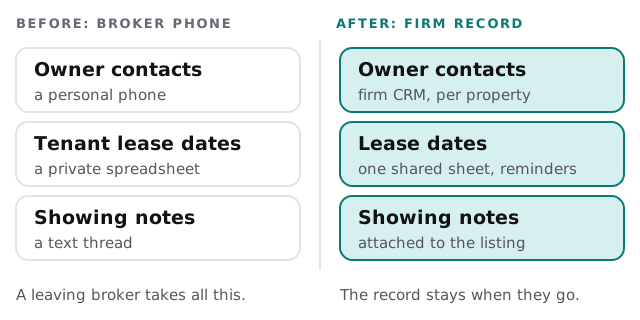
Lease expirations deserve special care. A date written in one broker’s notes is a listing nobody else knows is coming. A shared sheet with reminders means a renewal never surprises the firm.
Brokers work from everywhere
A commercial broker is more often in a car, a lobby or a tenant’s conference room than at a desk. That changes what a laptop and phone need:
- Offline-friendly documents. Offering packages and floor plans must open on a weak signal during a tour.
- Safe public networks. Sign-in that doesn’t depend on a lobby’s guest Wi-Fi.
- Screen locks and encryption on. So a lost device is an inconvenience, not an incident.
- Quick replacements. A broker without a working laptop on a closing day is a cost the firm feels at once.
Small firms feel this most
A firm of five to thirty people usually has no IT staff. One office manager or principal holds the admin passwords, and the same person handles the printer. That works until a deal is in diligence and the shared drive stops syncing. We take on the admin accounts, the updates and the backups so the principal isn’t doing it between showings.
A Wednesday in diligence week
Two buyers are in diligence on different buildings. Each lender’s analyst has a guest account on that one deal folder only. An associate updates the rent roll once, and both the attorney and the lender see the current version. At 4:30 a broker’s laptop is left in a taxi, and the firm locks it and signs the account out from a list, before the next email arrives. Nothing leaks, and the deal calendar doesn’t move.
What we need from you
- Your deals. Active ones and the parties on each.
- Your subscriptions. Every data and listing seat, and whose name it’s under.
- Your tools. CRM, storage, e-signature, accounting.
- Your departures. The last two brokers to leave, and what went with them.
Questions to ask any provider
- How do you give outside parties access to one deal and no others?
- What happens to a broker’s accounts on the last day?
- Can you list every subscription we pay for and who uses it?
- Can a lost laptop or phone be locked the same day?
Monthly care covers the access controls, backups and updates behind those answers. Book the free IT check and you’ll get a plan and a fixed quote.
A brokerage’s value is its record of who owns what and who leases where. IT should make sure that record belongs to the firm.