On a Wednesday morning your laptop will not start. There is a client call at two. You know the files are in there somewhere and the passwords are in your head, mostly. IT support for solo professionals is built for that morning, because you are the one person who cannot hand the problem to someone else.
The good news is that one-person IT is small. A short list of habits does most of the work.
Two versions of the same Wednesday
How long it takes to get working again depends almost entirely on what you did before it happened. The lengths below are illustrative, but the order of events is not.
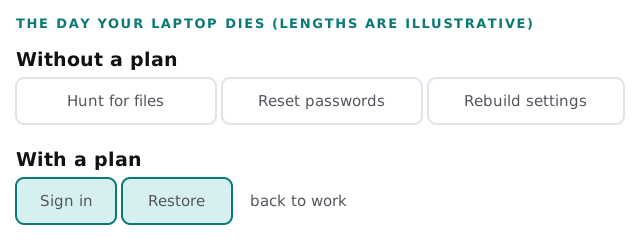
If your first thought is that the long bar is you, the sections below fix it.
What you carry alone
A team can spread risk around. A solo professional cannot, so the usual gaps are specific to you.
| The gap | How it shows up | What closes it |
|---|---|---|
| One device holds everything | A dead laptop stops all work | A backup that is separate from the laptop |
| Passwords live in your head | A forgotten one costs an hour | A password vault with a recovery plan |
| Your phone is your second step | A lost phone locks you out | Recovery codes stored away from the phone |
| Nobody else knows the setup | Illness leaves clients waiting | A one-page note a trusted person can follow |
| The domain is in an old account | Email stops on a renewal date | Renewals in the calendar, and the login recorded |
The ten-minute month
You will not keep an elaborate routine. You might keep this one. Pick a date, such as the first Monday, and run four checks.
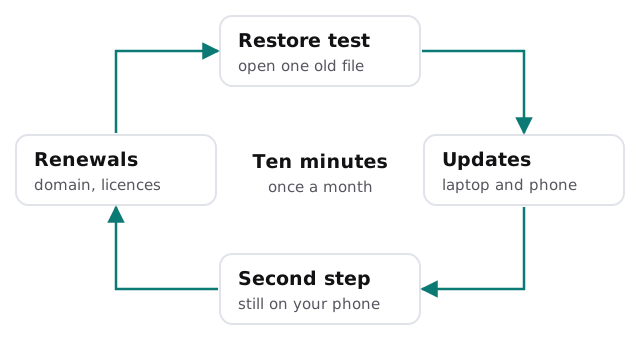
- Restore one old file. Pick something from last month, fetch it from the backup, open it.
- Install updates. On the laptop and the phone, including the ones you have been postponing.
- Check the second step. Make sure the code still arrives or the key still works.
- Look at renewals. The domain, the software licences, the phone plan and the warranty.
If you want more on what protects the laptop itself, see endpoint protection for small business. The home setup behind your desk is covered in IT support for home based businesses.
What to keep and what to hand off
| Keep doing it yourself | Hand it to someone else |
|---|---|
| The monthly check, if you will actually do it | Setting up the backup in the first place |
| Choosing which tools you use | Moving email or files between platforms |
| Saying who gets access | Switching access on and off when it changes |
| Telling us what is broken | Working out why it keeps breaking |
A help desk fits the right-hand column. You send the problem, a person replies, and you carry on with work.
Signs it is time to call someone
- You have a client who asks what happens to their data if you are ill.
- Something has broken three times and you have fixed it three times.
- You hired a helper, and now two people need access to the same things.
- You are avoiding an update because you are afraid of what it will break.
What a first conversation looks like
We ask what you do, which devices you use and which accounts you cannot work without. We look at what you have, tell you what matters and give you a plan and a fixed quote. You decide what, if anything, to take on. For a first look, the free IT check is the place to start.
If you are the only one who can fix your IT, then the fix is a note, a backup and a person you can call.
What we need from you
- A list of the devices and accounts you rely on most.
- The date you last tried to restore anything.
- The one thing that scares you most about it all.