Somebody in your office built a Power Automate flow last spring. It sends a Teams message when a form arrives and nobody has looked at it since. Then the form changes, or the person leaves, or a connection expires, and the flow quietly stops. That is the moment small businesses go looking for a Power Automate consultant for small business: not to build something new, but to make what exists dependable.
Three clocks every flow runs against
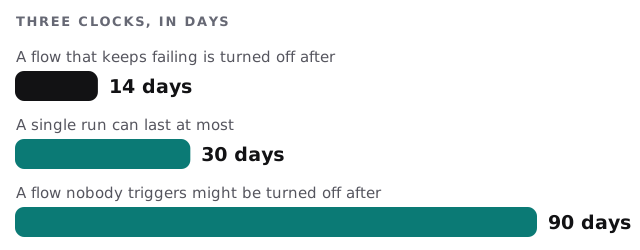
Microsoft publishes limits for cloud flows, and three of them behave like clocks. They are the reason a flow can go quiet without anyone touching it.
| Rule on Microsoft’s page | What it means for you |
|---|---|
| A cloud flow whose trigger or actions fail continuously is turned off after 14 days | Without an alert, a broken flow ends up off, and the work it did stops |
| A flow not triggered within 90 days might be turned off | Seasonal flows, such as a year-end reminder, need a plan |
| A run can last up to 30 days, and run history is kept for 30 days | Approvals that wait on people are fine, but records of old runs don’t last |
The 90-day rule has a carve-out: flows owned by users with premium licences, or assigned capacity licences, aren’t subject to that suspension. Owners and co-owners are notified 30 days before it happens. We read these figures again from Microsoft’s page before quoting them, because Microsoft can change them. In practice the fix is rarely clever: an alert on failure, a calendar note for the seasonal flows and a second owner on everything that matters.
Where a flow lives matters
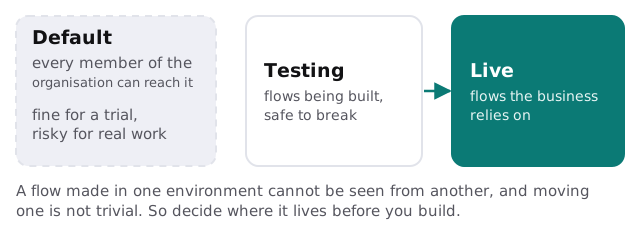
Power Automate separates work into environments. Microsoft’s help says environments create boundaries between types of work, and many organisations use them to keep flows still in development apart from those ready for wider use. Every member of an organisation can access the default environment. A flow created in one environment isn’t visible from another, and components can’t easily be moved between them.
What a consultant should leave behind
- A flow register. Each flow, its purpose, owner, co-owner and the connections it uses.
- Failure alerts. A message to a named person when a run fails, long before the 14-day limit bites.
- Shared ownership. Co-owners on every flow that matters, so a leaver doesn’t take it with them.
- Sensible triggers. Filters on the trigger, so a flow runs when it should and not on every change.
- A yearly check. A date in the diary to review what is running, what is idle and what can go.
When Power Automate fits, and when it doesn’t
| Your situation | Likely answer |
|---|---|
| Approvals inside Teams or Outlook | Power Automate fits well |
| Work lives in Excel, SharePoint and Outlook | Power Automate, perhaps with an Excel automation expert |
| Mostly non-Microsoft tools | Consider Zapier or n8n |
| Complex logic, high volume | A small custom app instead |
Rather build it yourself?
Power Automate is approachable. Our guide to setting up Power Automate for your team walks through a first flow, and our Microsoft 365 setup for small business page covers the platform around it. Bring us in when the flow touches money or customers, or when you have six flows and nobody knows what they all do.
What we need from you
- A list of the flows you have, even if you are not sure who made them.
- Access to the Microsoft 365 admin side, with your approval.
- A short description of the process each flow supports.
We start with a plan and a fixed quote, and a person on your side approves any change to a flow that touches customer records.
A flow nobody owns will eventually fail with nobody watching. Give every flow two owners and an alert.