A shared inbox gets two hundred messages a day. Somebody reads each one, decides whether it is a quote request, a complaint or spam, and copies the details into the CRM. A model can do the reading and sorting in seconds, and OpenAI API integration services are how you wire that into the place the work already lives. It is plumbing as much as AI, and the plumbing decides whether it keeps working.
Four things that decide whether it holds up
What you send
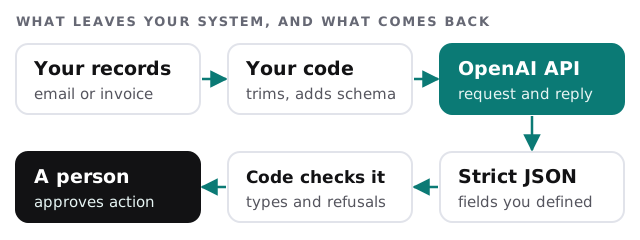
Send the minimum. If the task is to classify an email, the model needs the body and perhaps the subject, not the sender’s full record. Less data sent means less to worry about. OpenAI’s documentation says data sent to the API is not used to train its models unless you opt in, and that abuse-monitoring logs can be retained for up to 30 days unless longer retention is legally required. Zero Data Retention exists as an approval-based control, so it is something to request rather than assume.
What comes back
Free text is hard for software to use. OpenAI’s Structured Outputs feature constrains the reply to a JSON Schema you supply, so required fields are present and values come from the list you allow. A refusal does not necessarily follow your schema, so the response carries a separate refusal field, and your code checks for it before anything else. That check is what stops a refusal being written into a customer record. We also test the awkward cases, such as an empty email or one written in another language, because those are the ones that reach the model in real life.
What happens at the limit
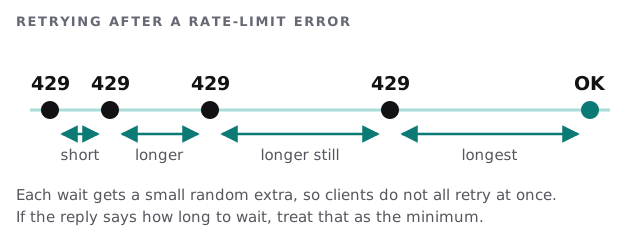
OpenAI measures limits in requests, tokens and in some cases images per minute, and they vary by model and by organisation or project. When you cross one, the API returns a 429 error, and failed requests still count against your per-minute limit, so resending straight away doesn’t help. OpenAI recommends exponential backoff with random jitter, honouring any Retry-After header and capping total retries. For work nobody is waiting on, it also points to its Batch API.
Who approves
Drafting a reply is low risk. Changing a price, sending an email or closing a ticket is not. We mark each action as automatic, reviewed or never, and a person on your side approves the first two lists.
What we typically build
| Task | Model does | Person does |
|---|---|---|
| Sort a shared inbox | Labels each message and pulls out key fields | Checks the uncertain ones |
| Summarise calls | Writes a short summary and action list | Edits before it is filed |
| Read a document | Extracts the fields you named | Approves anything that looks odd |
| Draft replies | Proposes a first draft in your tone | Sends it |
Signs this is the right project
- A repetitive task whose answer is mostly obvious to a human.
- Input that arrives as messy text, not clean fields.
- A system that can accept data in a clear format.
- Someone willing to review the first month of outputs.
Rather not build it?
If a person doing the typing is fine, a ChatGPT team setup is quicker and needs no code. For the middle path, our page on ChatGPT integration for small business covers where the chat tool fits, and Claude API integration services describes the same work with a different model provider. We can build against either, and we will tell you if your task suits neither.
What we need from you
- An example of the messy input, with sensitive details removed.
- What a good result looks like, in one or two sentences.
- The system where results should land.
- A name for whoever approves the output.
We start with a plan and a fixed quote, and we test on your real examples before anything is switched on.
The model is the easy part. Defining what it may send, what it may return and who approves is the work.