You run a service business and your best leads write the same message: “Can you give me a rough idea of the price?” Somebody has to reply, ask four questions, do some arithmetic and send a number. Meanwhile the visitor has asked two other companies. An instant quote calculator for service business moves that exchange onto your website, so the first answer arrives in a minute rather than a day.
It is a short form with the maths built in. It is not a chatbot, and it is not a promise. Think of it as your most experienced estimator’s rules of thumb, written down and put on the page.
One evening, start to finish
A homeowner finds you at 9:40 on a Tuesday night. They pick the type of job, enter the size, tick two extras and choose a rough timeframe. The page shows a range and a button to book a visit. Your office sees nothing until the morning, when the lead is waiting with every answer attached. Nobody was on the phone, and nobody had to guess what the customer meant.
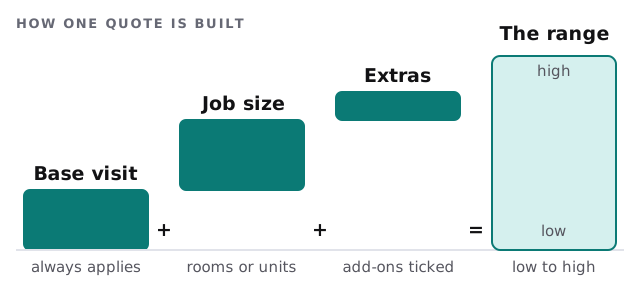
What goes into the formula
Your pricing already exists, usually in somebody’s head or an old spreadsheet. We turn it into rules in four steps.
- Collect real past quotes. Twenty or thirty recent jobs and what they actually cost.
- Find what moves the price. Size, access, material, urgency. Most trades have three or four drivers, and the rest is noise.
- Set the range width. Wide enough to be honest, narrow enough to be useful.
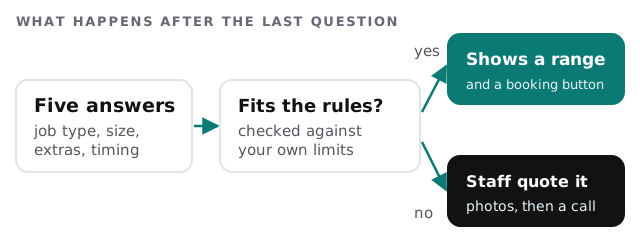
- Mark the edges. Write down the cases the formula should refuse, such as unusual access or commercial work.
You review the finished rules before anything goes live. We don’t set your prices; the calculator only applies the ones you give it.
Three kinds of answer
A range
For most residential and small commercial jobs. The visitor sees a low and a high figure and what could push it either way.
A starting point
For work billed by the hour or by the unit. The page shows what the first visit or the base package covers and says the rest depends on what we find.
No number
For anything outside the rules. The calculator says so plainly, gathers photos and notes, and routes the enquiry to a person.
Signs you need one
- The same four questions open most enquiries.
- Leads go cold between the first message and your reply.
- Quotes depend on who happens to answer the phone.
- Your estimator spends mornings on jobs you won’t win.
Where it should not be used
| Situation | Better approach |
|---|---|
| Every job is unique | A short intake form with photo upload, quoted by a person |
| Prices change weekly with materials | A calculator that shows a starting point only |
| Regulated work needing a site survey | Book the survey first, quote afterwards |
Rather build it yourself?
If your quote is a simple multiplication, a spreadsheet with a published link can do the job, and Excel automation or a Google Apps Script developer can tidy that up. When the quote must feed your CRM, handle photos or follow rules with exceptions, that is a small app, and similar to what we describe in an AI quote generator for contractors. If the leads should land in a pipeline, website form to CRM automation covers that half.
What we need from you
- Recent quotes and the jobs behind them.
- The three things that most often change a price.
- A list of jobs you would rather a person looked at.
- Where the leads should go.
We start with a plan and a fixed quote, and a person at your business approves the rules before the calculator goes live.
A calculator that knows when to say “let me look at that” earns more trust than one that always answers.