AI automation for moving companies has to start where the money is made and lost: the first few minutes of a lead, and the long day on which a plan meets a narrow stairwell. Everything between is paperwork, and a lot of it is the same paperwork repeated.
We build small AI tools and internal tools around that work. A person at your company approves what a customer sees.
The first five minutes of a lead
Many moving leads arrive from sources that sell the same inquiry to several companies. The customer is often comparing who answers, not who is cheapest. A tool can read the new lead, check whether the date is already full on your calendar and draft a reply that asks the two questions you always ask.
- Read. Origin, destination, date and size are pulled out of the form or email.
- Check. The date is compared with your booked crews, so you don’t reply with an open slot that isn’t.
- Draft. A short message goes to your coordinator with the missing details already requested.
- Wait. If the customer hasn’t answered, a follow-up is queued for a person to approve.
Estimates from photos
An in-home survey takes an estimator out of the office for an hour. A video call takes less, but someone still types the list afterward. If a customer sends a few photos or a walkthrough clip, a tool can build a first-pass inventory that your estimator corrects.
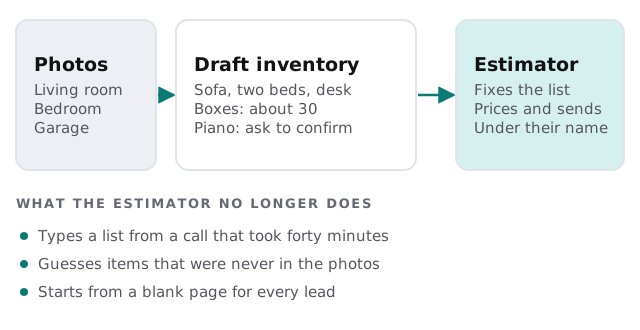
It also leaves questions where it can’t tell: is that a hutch or a bookcase, and does the piano come apart? The estimator asks the customer rather than assuming.
Move day paperwork that stops trucks
| Item | Who usually asks | What gets missed |
|---|---|---|
| Certificate of insurance | The building manager | Sent after the elevator is already booked |
| Elevator or dock reservation | Property management | A date change that isn’t passed on |
| Parking or street permits | The city or building | Left until the day before |
| Access notes and contacts | Your crew lead | A gate code in a text that never reached the job |
A tool builds a checklist for each booking from its addresses and flags the items still open as the date gets close. Your coordinator sends the request, and the tool tracks the reply.
Your year is a bar chart
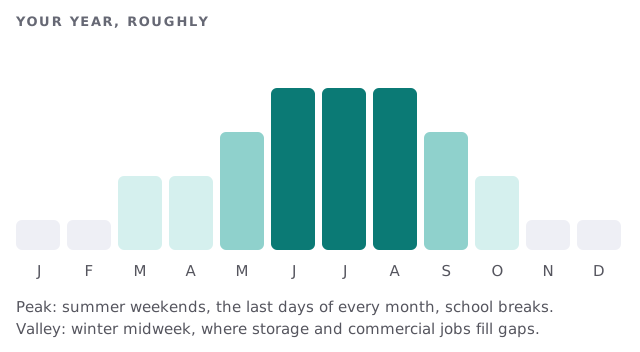
In a rush, the tools speed up replies and crew sheets. In a valley, they earn their keep differently: past customers are listed for outreach, quiet weekdays are matched to storage and commercial inquiries, and reviews are requested while the move is still a good memory.
Claims, sorted
When a customer reports damage, the pile that follows is photos, an inventory line and an email thread. A tool can group them by claim, attach the inventory entry and the crew’s notes and put the case in front of the person who handles claims. They still decide the outcome.
The software around a mover
- Estimating and CRM: leads, inventories, quotes and bookings.
- Dispatch and crew scheduling: trucks, crews, hours and job sheets.
- Lead sources: forms and purchased inquiries that need a fast first reply.
- Warehouse and storage: inventory in containers or a facility.
- Accounting and payments: deposits, invoices and tips.
Each of these has its own way of letting other tools in. We check what yours allows before we promise anything.
What a Friday before month-end looks like
Your coordinator sees six bookings for tomorrow. Four are complete. One is missing a building contact, so a message is drafted and sent. The last needs a certificate of insurance, which is requested. The crew leads get their sheets. Nobody is calling the office from a driveway to ask where to park.
Questions to ask any provider
- Can it work from photos, or does it only work from forms?
- Who sees the customer’s address and phone number, and where is it stored?
- Can my coordinator override any draft before it goes out?
- What happens to a lead the tool can’t read?
What we need from you
Two or three real estimates with the names removed, your rate rules and the systems you use. After the free IT check you get a plan and a fixed quote. A real person replies within 1 business hour, Monday to Friday, 9am to 5pm Pacific. Rather build it yourself? Setting up Zapier for your team covers a simple lead-to-reply flow.
The mover who answers first and arrives prepared gets the next call. Tools can handle both, and your crew handles the heavy part.