AI automation for auto repair shops starts at the counter, not under the hood. Your technicians are good at the car. Your bottleneck is usually the conversation about the car: the estimate nobody understands, the approval that takes until three o’clock, the brake job a customer said no to in March and never heard about again.
We build small AI tools and internal tools that sit around your shop management software. The advisor stays in charge of every message.
A Wednesday, once it’s set up
A truck comes in with a grinding noise. The technician finishes the inspection, takes photos, and types a note the way he always does: short, full of abbreviations, perfectly clear to him.
By the time he’s put the wrench down, a draft is waiting on the advisor’s screen. It has the photos attached, a two-sentence explanation a customer can follow, and the labor and parts lines from the shop’s own pricing. The advisor changes one line, sends it as a text, and the customer approves from the grocery store. The bay is not sitting idle.
Turning shorthand into a clear estimate
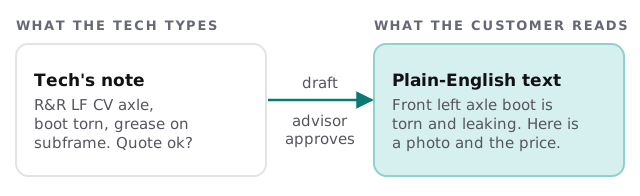
The customer sees what is wrong, why it matters and what it costs. Safety items can be marked so they always lead the message. Nothing leaves without a person pressing send.
What gets chased automatically
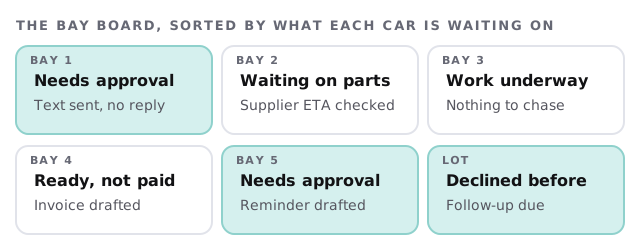
- Unanswered approvals. If a customer hasn’t replied after the interval you choose, a polite reminder is drafted for the advisor.
- Parts that haven’t arrived. The tool checks the order against the supplier’s confirmation and tells the advisor which cars are at risk.
- Finished cars that haven’t been paid for. An invoice summary and pickup message are ready as soon as the work order closes.
- Declined work. The things a customer postponed come back on a schedule, with the original photo and a short, honest note.
- Review requests. After a good visit, a thank-you with a link, sent only when the advisor is happy to ask.
The software around a shop
| Category | What you might use | What the tool adds |
|---|---|---|
| Shop management | Estimates, work orders, invoices | Reads open orders, drafts status messages |
| Digital inspection | Photo-based inspection reports | Pulls findings into a customer-friendly summary |
| Parts ordering | Supplier catalogs and portals | Flags late or backordered lines |
| Payments and texting | Card terminal, customer messaging | Holds drafts until approved |
| Accounting | Bookkeeping software | Matches invoices to payments |
We don’t say we have integrated any named product. If you’d like to try a simple version yourself first, setting up Zapier for your team shows how to pass a field from one tool to another.
The seasonal squeeze
Shops feel weather. The first cold snap brings batteries and tires, and a summer heat wave brings coolant and air conditioning. Those are the weeks when advisors have the least time to write careful estimates, which is exactly why the tool should be tested during a quiet stretch and left running through the busy one.
What stays with your people
The diagnosis, the decision to recommend a repair, any word about safety and every conversation with an unhappy customer. The tool reads the note and the photos your technicians already produce. It never decides what the car needs, and it never makes a promise about how long a repair will take.
Signs it’s time
- Cars wait in bays while a message sits unread.
- Customers phone to ask “is it done?” because nobody texted.
- Your best technician is the only one who can explain the estimate.
- You can’t say how much declined work you’d have captured last year.
What we’d need to see
Tell us which system holds your work orders, how techs record findings, and which step makes your advisor groan. We turn that into a plan and a fixed quote after the free IT check. A real person replies within 1 business hour, Monday to Friday, 9am to 5pm Pacific.
A car in the bay costs you money every hour it waits. The estimate should be the fastest part of the job.