AI automation for auto dealerships pays off in two places that rarely talk to each other: the sales floor, where a lead is only as good as the speed and accuracy of the first reply, and the service drive, where the same lookups happen on every car before eight in the morning.
We build small AI tools and internal tools around the systems you already run. A manager or advisor approves what customers see.
Three desks, three kinds of paper
Sales and the BDC
A shopper fills in a form on your site, messages a marketplace listing and calls about the same truck. In most stores that is three leads, three reps and one very confused customer. The work here is deduplicating and drafting, not selling.
Service
The advisor opens a repair order and looks up open recalls, the last visit, the warranty status and any declined work from last time. Each lookup is quick. Fifty of them before ten o’clock are not.
The back office
Title and registration paperwork, deal jackets, floorplan reconciliation and month-end reports. Highly repetitive, document-heavy and checked by a person at the end. Clerks here often hold the most institutional knowledge in the store, so a good tool starts by writing down what they already do.
One queue for every lead
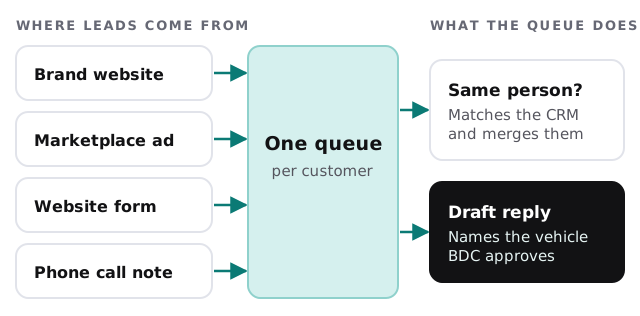
The draft names the vehicle the shopper asked about, mentions whether it is on the lot, and proposes a time. It does not quote a price, discuss a trade value or promise financing terms. Those stay with your people.
The service day, in three beats
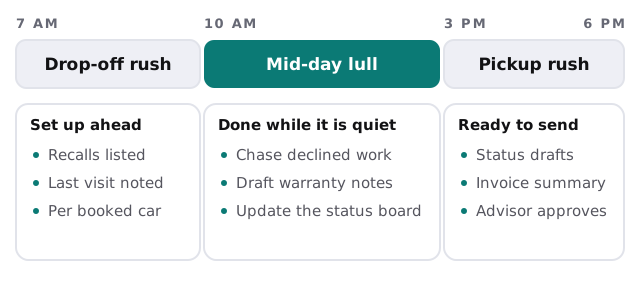
Mornings and afternoons belong to customers. The lull between them is when a tool can chase last month’s declined brake job with a polite, specific message the advisor has already approved, and draft the notes a warranty claim will need.
Where it plugs in
| Category | Typical examples | What the tool does |
|---|---|---|
| Dealer management system | The core system for deals, parts and repair orders | Reads open work, never changes accounting |
| CRM and lead handling | Sales and BDC tools | Merges duplicates, drafts first replies |
| Inventory and website | Your vehicle feed and listings | Checks the vehicle is still on the lot |
| Texting and email | Customer messaging | Holds drafts for approval |
| Scheduling | Service appointment booking | Prepares each booked car’s record |
We make no claim of having integrated any particular product. Where a tool is simple enough, setting up Zapier for your team can move a field from one of these to another without any custom code.
Month-end, without the copy-paste
Before the last week of the month, someone builds the same few reports from several screens. A tool can assemble the draft: units by source, open deals by stage, declined service by advisor. The manager reads it and corrects the figures where the source systems disagree, which is often the useful finding in itself.
How we’d start
- Pick one desk. Either the BDC or the service drive, not both.
- Walk it with us. We watch one real morning, or you describe it, and list every lookup.
- Build the smallest tool. Usually the lead merge or the prepared repair order.
- Run it beside the old way. Staff compare for a couple of weeks, then retire the manual step.
- Add the next one. Only then.
Questions to ask any provider
- Which of my systems will you read, and which can you write to?
- What does a rep see when the tool isn’t sure whether two leads are the same person?
- Where is every message held until a person approves it?
- Can I see what it did on a specific customer?
We answer those on the free IT check, then send a plan and a fixed quote. A real person replies within 1 business hour, Monday to Friday, 9am to 5pm Pacific.
The sale starts when somebody answers well. The tool’s job is to make sure that somebody already knows who they’re talking to.