Managed IT services for restaurants are tested in a few hours each week. When the dining room is full, the technology either disappears or it becomes the problem. A good setup is about the unglamorous parts: a network that stays up, devices that update on a quiet Tuesday and a plan for the hour when something fails anyway.
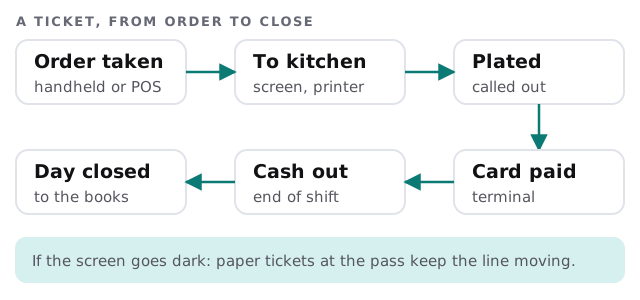
Follow one ticket
Walk the path an order takes. Wherever the path crosses a device or a network, something can stall.
Walk the floor
Each area of a restaurant has its own gear and its own way of failing. Nothing here needs special equipment, but it does need someone to know it’s all there.
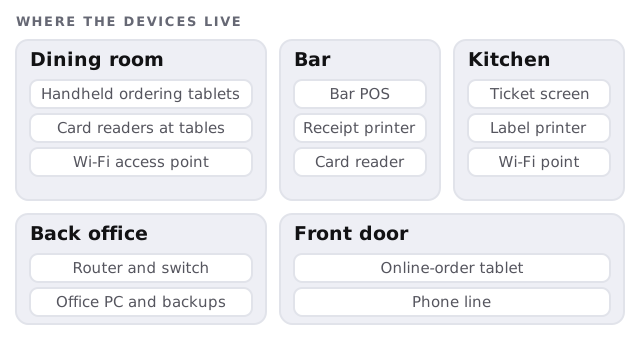
| Area | What to have ready |
|---|---|
| Dining room | Charged handhelds, a spare card reader, access points that cover the corners |
| Bar | A POS that can work if the main one is busy, a receipt printer with paper |
| Kitchen | Screens or printers that are wired, since steam and grease are hard on Wi-Fi |
| Back office | Backups of the sales data and the menu, plus the vendor’s support numbers |
The tablet pile by the door
Delivery and online ordering often arrive as separate tablets from separate companies. Each has a login, often created by whoever signed up first. Gather those logins in one place under a role account the owner controls. Check that menu changes, especially prices and sold-out items, reach each platform when they are made, not when someone remembers.
Why the networks are split
A restaurant usually has three kinds of traffic on one router: guests on their phones, staff devices and the machines that take payment. Keep them apart. Guest Wi-Fi gets internet and nothing more. The POS, printers and card readers share a second network. The office PC, with payroll and the books on it, sits on a third. If a guest’s phone has a problem, it stays on the first.
Cables beat radio wherever a cable can reach. A kitchen printer on a wire rarely goes missing mid-rush, and the access point in the dining room then has fewer devices to serve.
A quiet-week routine
Restaurants have slow days, and those are the days for work.
- Update devices on the quietest weekday morning, never before service.
- Test a card sale on every reader and a print on every printer.
- Check the backup finished and the menu is saved with it.
- Review who has access, and remove anyone who left.
- Restart the router only if you can do it outside opening hours.
When the connection fails mid-service
Prepare one page that any shift manager can follow:
- Where the paper tickets are.
- Whether the card readers keep working without the internet, and what limits apply, checked with your payment provider.
- Where the hotspot is, and which devices can join it.
- Who to call at your internet provider, with the account number written down.
Practice it once in a slow hour. A page nobody has tried is a wish.
Seasons and special nights
Patio season, holiday parties and a big game on the bar screens all change the load. Ask before each one: will the guest network cope with more phones, is there an extra tablet or printer to set up and does anyone need a temporary login? A short note to us a week ahead is cheaper than a scramble on the day.
Staff come and go
Restaurant turnover is high. New hires should get a login, not a borrowed one, and a manager’s departure should close that person’s access to the POS, the delivery tablets, the schedule and the payroll tool the same day.
What we need from you
- Your POS, ordering and payment providers, and who signed up for each.
- A sketch of the network: the router, the switches, where cables run.
- Your busiest hours, so we never touch anything then.
Monthly care covers access controls, backups and updates. The free IT check ends in a plan and a fixed quote.
The best time to fix the Wi-Fi is Tuesday morning. The worst time is when the first table sits down.