Managed IT services for optometry practices are mostly about a chain. A patient moves from pretest to exam lane to imaging, and each stop produces data that has to arrive in the same chart. If one link fails, a technician is typing numbers by hand or hunting for an image on a computer in the back.
The exam lane is a chain
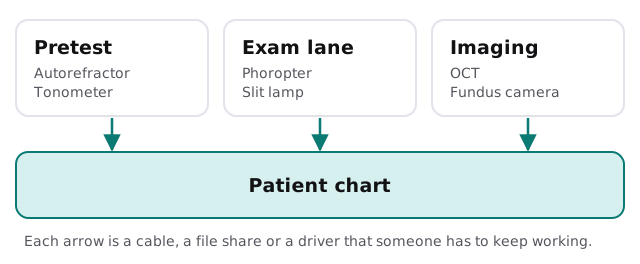
An optometry practice often runs equipment from four or five makers, bought in different years. Each has its own computer, its own software and its own opinion of which Windows version it will tolerate. We keep an inventory of every instrument: the maker, the model, how it connects, who supports it and what it was last tested against.
Instruments that save images
| Instrument | Produces | Typical IT problem |
|---|---|---|
| Autorefractor and tonometer | Measurements | Results typed by hand into the chart |
| Visual field analyser | Test plots | Old PC that can’t be updated |
| OCT | Cross-section scans | Large files filling the local disk |
| Fundus camera | Retinal photos | Images saved under the wrong patient |
| Topographer | Corneal maps | Software tied to a retired operating system |
Images grow quickly. A practice that has taken photos for years has a lot of them, and the folder on the oldest computer is usually the one with no backup. Decide where images live, how long you keep them and how you will bring them back after a failure.
The optical counter
Eye exams feed the dispensary: frames, lenses, lab orders and fittings. A job passes through the point of sale, the lab and the person who tells the patient it is ready.
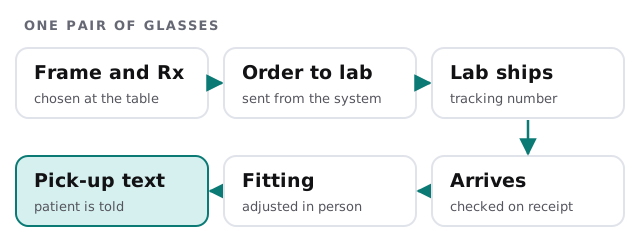
Check three things here. The prescription must go from chart to order without retyping. The lab connection should be tested after updates. And the pick-up text or call should be part of the system, not a sticky note by the register.
When the calendar tightens
If your patients’ benefits reset with the calendar year, the weeks before year end fill the schedule and the optical counter together. Before that stretch:
- Pause nonessential changes to instruments and the chart.
- Test insurance eligibility checks and lab ordering with a real order.
- Prepare a spare PC or tablet, already set up.
- Confirm backups completed in the last day.
- Keep the maker’s support numbers near the front desk.
What the HIPAA Security Rule asks for
If your practice is a covered entity, the Security Rule’s administrative safeguards ask for an accurate and thorough assessment of potential risks to electronic health information, and for a contingency plan with a data backup plan, a disaster recovery plan and an emergency mode operation plan. Those are the headings. What they mean for your practice depends on your systems, and we never claim that a practice or a product is compliant. We help with the technical side: what you have, what could fail, and what you could restore.
Front desk and back office
The front desk needs fast check-in, quick eligibility checks and working card terminals. The back office needs billing and reports. Keep the instrument computers off the guest network, give each person their own login and review the list of users whenever staff change.
What we need from you
- A list of instruments, with makers and how each connects.
- Where images are stored now, and which computer holds them.
- Your optical system and labs.
- Your busiest weeks and your last unplanned downtime.
Monthly care covers access controls, backups and updates. The free IT check ends in a plan and a fixed quote.
An instrument is only as useful as its path to the chart. Test the path, not just the machine.