Managed IT services for hotels are judged where guests can see them: a line at the front desk, a card that won’t cut a key, a room that is clean but shows as dirty. Hotels run a lot of different systems on one tight schedule, and everything has to agree about one thing, which room is ready right now.
Four layers, one front desk
Hotel technology isn’t one system. It’s layers, and the front desk sits in the middle of them.
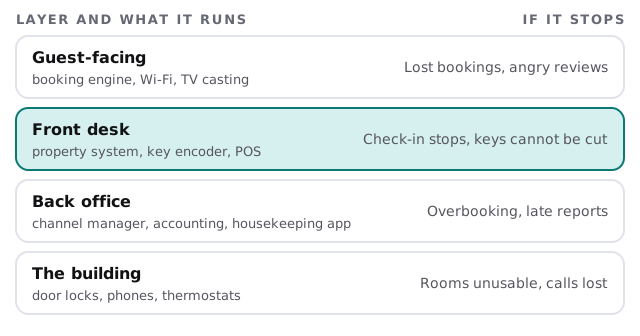
The guest-facing layer is what people see before they arrive: a booking engine and Wi-Fi. The back office handles the channel manager, accounting and housekeeping. The building includes lock systems, phones and thermostats, each often installed and supported by a different vendor. A good IT partner keeps a list of those vendors, because most of the work during an outage is knowing who to call and what to ask.
Every room is a status
The most important data in a hotel is small and constantly changing: the state of each room.
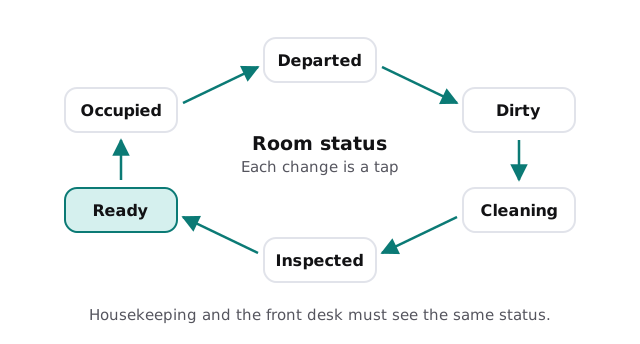
When housekeeping uses a phone or tablet app tied to the property system, the desk sees a room become ready the moment it is. When the app loses connection in a basement corridor, or when the status is passed on by radio, arrivals wait. Wi-Fi coverage in stairwells, service corridors and laundry rooms is as much a part of the guest experience as the lobby is.
Three networks, not one
- Guests. Rooms, lobby and meeting spaces. Internet only.
- Staff and systems. The front desk, the property system, back-office computers and printers.
- Payments and locks. Card terminals and door-lock software on their own networks, with the fewest possible connections.
A single shared network is cheap to set up and expensive when something goes wrong in it.
What a hotel runs, and how it fails
| System | Job | Common failure |
|---|---|---|
| Property management system | Reservations, check-in, billing | One shared login, no tested backup |
| Channel manager and booking engine | Sends availability to booking sites | Availability lags, rooms oversold |
| Key and lock system | Cuts keys, controls doors | Encoder driver breaks after an update |
| Point of sale | Restaurant, bar, shop | Posts to the wrong room |
| Housekeeping and maintenance app | Room status, work orders | Dead zones in service areas |
| Phones and voicemail | Front desk, rooms, wake-up calls | Old phone system nobody can reconfigure |
Seasons and weekends
Occupancy swings: weekends, local events, holidays and a summer or winter high season, depending on where you are. We schedule updates for the quiet midweek and avoid changing the property system, the lock software or the booking connections in the days before a known high-demand period. Anything unavoidable gets a rollback plan.
When the main system is down
Every hotel should have a downtime kit, and most don’t. It is a printed list of today’s arrivals and departures, a sheet for writing down changes by hand and the phone numbers for your system, lock and network vendors. Keep the list updated each morning, since a printout from last week helps no one. When the system comes back, someone enters the paper changes in a set order, and the room statuses are checked against the real rooms. It costs almost nothing, and it turns an outage from a crisis into an inconvenience.
Small hotels, small teams
An independent hotel or inn usually has a manager who is also the IT department. They reset the printer, restart the encoder and answer the call from the booking site. We take on the accounts, updates and backups, and write down the vendor contacts, so a night auditor isn’t stuck at 2 am without a number.
What we need from you
- A walk-through, front desk to laundry, noting where devices sit.
- Your system and vendor list, with who supports each.
- Your high-demand dates for the next year.
- How you check in a guest when the main system is down, if you do.
Monthly care covers access controls, backups and updates. Start with the free IT check, which ends in a plan and a fixed quote.
Guests rarely notice hotel IT when it works. They notice the line at the desk when it doesn’t.