Managed IT services for ecommerce businesses sound odd at first. You have no server room, and your store lives on someone else’s platform. But the risks haven’t gone away. They’ve moved into accounts: who owns the domain, who can change the checkout, who can reach the payout settings. Those are the things that stop sales.
Six accounts, one weak point
Every store hangs on a small ring of services. Look at how each of them recovers a lost password, and the picture changes.
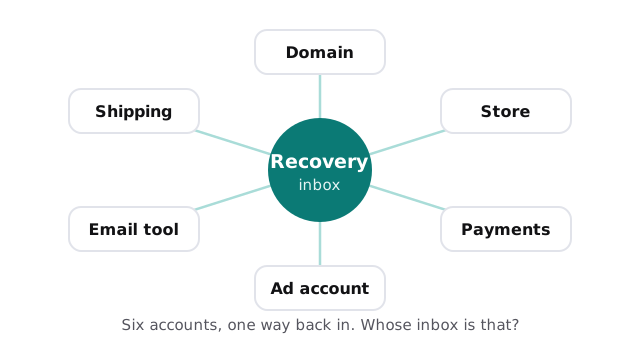
The fix is plain and unglamorous.
- Put the business in charge. Owner accounts belong to a company address, not a personal one.
- Give people their own logins. Staff, freelancers and agencies each get limited access under their own name.
- Add a second sign-in step. Especially on the domain, the store admin and the payments account.
- Keep two recovery routes. Two trusted people, written down somewhere safe.
- Review the list quarterly. Remove the freelancer from last year’s redesign.
What the card rules ask of you
Card data is the part where store owners often feel unsure. The PCI Security Standards Council describes its data security standard as intended for entities that store, process or transmit payment account data, and it says it does not enforce compliance. Whether a store must validate, and how, is set by the payment brands and acquirers that run the programs. In practice, your processor is the first source for what it expects of you. We help with the technical hygiene around it, such as account access and updates, and we don’t certify anything.
The pieces behind a sale
| Piece | What it does | Where it breaks |
|---|---|---|
| Hosted storefront | Catalog, cart, checkout | An app or theme change breaks checkout |
| Domain and DNS | Points your name at the store and the email | Registrar login on someone’s old email |
| Payment processor | Takes payment, pays you out | Payout details changed by an attacker |
| Inventory and shipping | Counts stock, prints labels | Two systems with different stock numbers |
| Email and ad tools | Campaigns, flows, retargeting | A former agency still has access |
| Support inbox | Order questions, returns | Only one person can read it |
Peak season is an IT event
For many stores, a few weeks of the year carry much of the revenue. Those weeks are the wrong time to find out the checkout is slow or that nobody can reach the payment account.
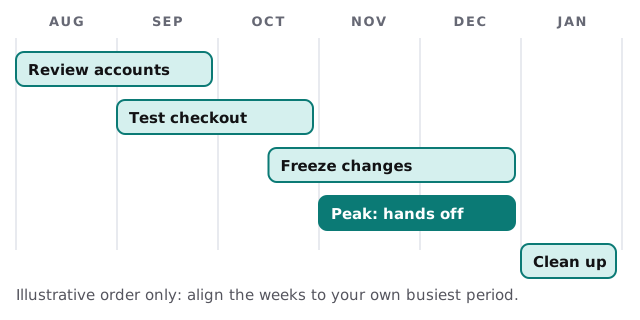
Who runs the store day to day
Most small online stores have an owner, maybe a part-time developer and a support person. They all need something different. The owner needs the payout account safe. The developer needs to change a theme without being able to change bank details. Support needs to see orders but not export the whole customer list. Setting access by role makes each person’s job easier and the whole store harder to damage.
Backups for a store you don’t host
“The platform backs it up” is half true. The platform keeps its own systems running, but it doesn’t promise to rewind a mistake you made. A bulk edit that blanks product descriptions, an app that deletes a collection or a deleted discount structure is your problem to undo. So we keep regular exports of products, customers, orders and theme files in a place you control, and we test that one can be read back. It’s an hour’s work that pays for itself the first time somebody deletes the wrong thing.
Warning signs
- A customer reports a checkout error and you can’t reproduce it.
- You don’t know which apps have access to your customer data.
- A payout was delayed and nobody knows why.
- The store works, but only one person knows how.
What we need from you
- Every account you can think of, and who is the owner of each.
- A list of apps and plugins on the store.
- The date your busiest weeks start.
- The last time anyone changed an important setting.
Monthly care covers access controls, backups and updates. The free IT check ends in a plan and a fixed quote.
A store can lose a week of sales to one locked account. The cheap fix is deciding, before it happens, who owns each login.